CI/CD 파이프라인이 운영 배포 중 403 Forbidden을 내며 멈췄습니다. 반대로 권한을 넓게 주면 실수로 모든 Namespace를 수정할 수 있는 위험이 생깁니다. RBAC은 Kubernetes API 접근을 필요한 만큼만 허용하는 운영 보안의 기본입니다.
CI/CD 파이프라인에서 새벽 3시에 배포가 실패했습니다. 로그를 보니 Error from server (Forbidden): deployments.apps is forbidden: User "system:serviceaccount:ci:ci-sa" cannot list resource "deployments" in API group "apps" in the namespace "production". 파이프라인을 고치기 위해 급하게 cluster-admin ClusterRole을 바인딩했습니다. 배포는 성공했지만, 이제 CI 봇이 클러스터의 모든 것을 할 수 있게 되었습니다. 보안 감사에서 이 설정이 발견됐고, 즉각 수정 요청이 들어왔습니다.
Kubernetes RBAC(Role-Based Access Control)은 "누가(Subject) 어떤 리소스에(Resource) 무엇을(Verb) 할 수 있는가"를 제어합니다. 올바르게 설계된 RBAC는 사고가 발생했을 때 피해 범위를 제한하는 가장 효과적인 방어선입니다. CI 봇은 자신이 배포하는 네임스페이스의 Deployment만 수정할 수 있어야 하고, 로그 수집 에이전트는 pods를 읽을 수만 있어야 합니다. 이 원칙을 최소 권한(Principle of Least Privilege)이라고 합니다.
- 1RBAC 핵심 4종(Role, ClusterRole, RoleBinding, ClusterRoleBinding)을 설명할 수 있다
- 2파드에 부여하는 K8s ID인 ServiceAccount를 설명할 수 있다
- 3최소 권한 원칙으로 권한을 설계할 수 있다
- 4kubectl auth can-i로 권한을 시뮬레이션할 수 있다
- 5403 Forbidden 디버깅 워크플로를 수행할 수 있다
- 6CI/CD ServiceAccount 권한을 실전에서 설계할 수 있다
kubectl auth can-i '*' '*' --all-namespaceskubectl create namespace rbac-demo && kubectl create namespace productionkubectl get clusterroles | grep -v system | head -10kubectl get clusterrolebindings | grep -v system | head -10RBAC 핵심 개념: 4가지 리소스
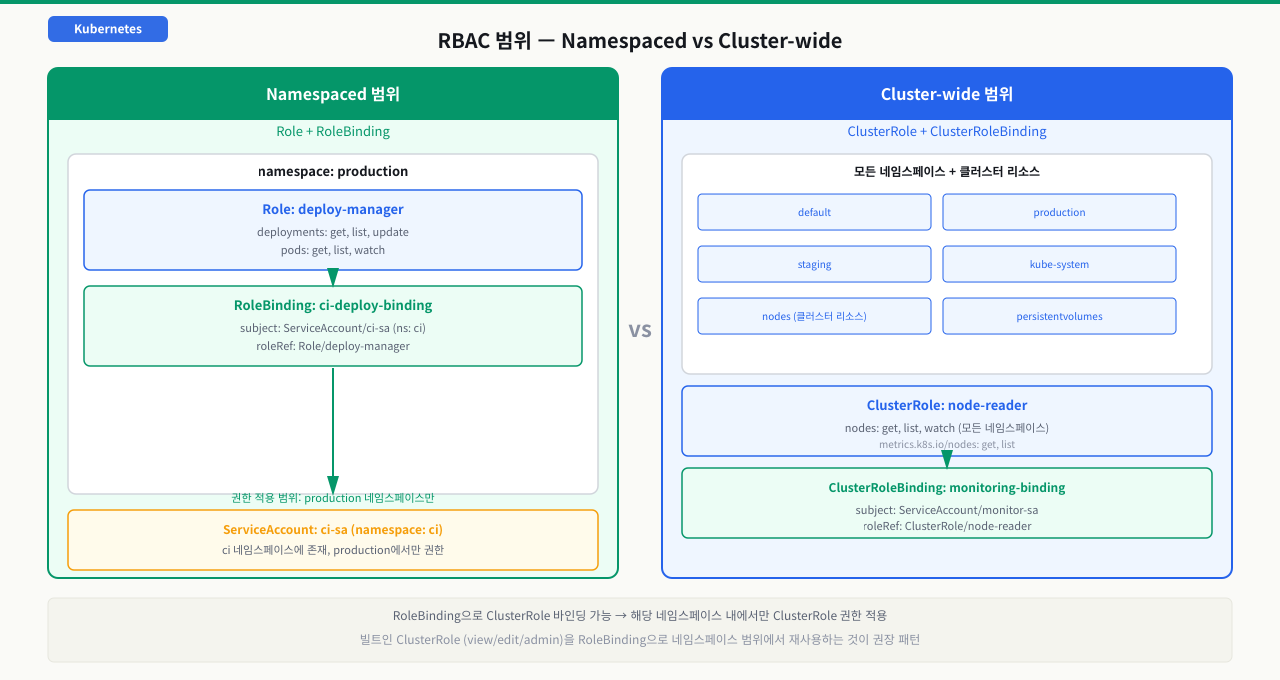
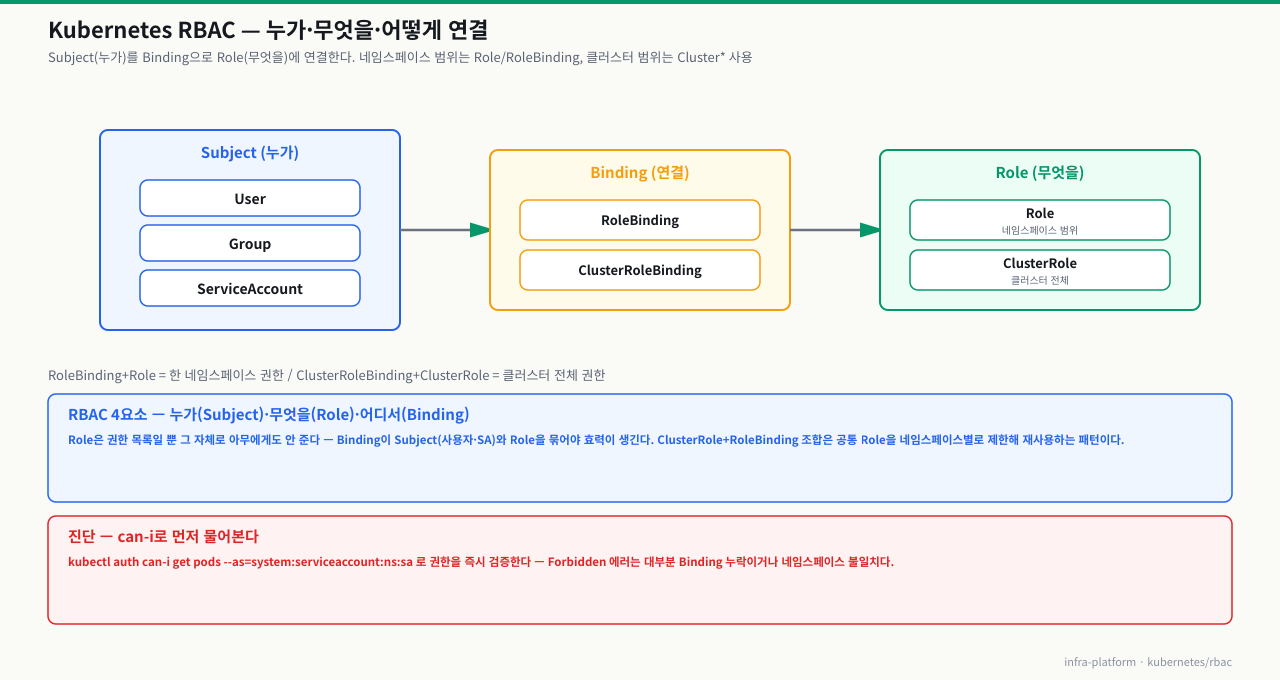
CI/CD 봇이 새벽에 배포 실패 알림을 보냅니다. 로그를 보니 403 Forbidden입니다. 급하게 cluster-admin을 부여하면 배포는 되지만 보안 감사에서 지적을 받게 됩니다. 반대로 너무 좁게 주면 다음 배포에서 또 같은 오류가 납니다. RBAC는 "누가 어떤 리소스에 무엇을 할 수 있는가"를 명시적으로 선언하는 시스템입니다. Role과 ClusterRole은 권한의 내용을 정의하고, RoleBinding과 ClusterRoleBinding은 그 권한을 특정 주체에게 연결합니다. 이 네 가지 리소스의 관계를 이해하면 최소 권한 원칙을 정확하게 설계할 수 있습니다.
RBAC는 권한 정의(Role/ClusterRole)와 권한 부여(RoleBinding/ClusterRoleBinding)로 나뉩니다.
 확대
확대
 확대
확대
Verb (동작) 종류:
get,list,watch— 읽기create,update,patch— 쓰기delete,deletecollection— 삭제*— 모든 동작
Resource 예시:
- 네임스페이스 리소스:
pods,deployments,services,configmaps,secrets - 클러스터 리소스:
nodes,persistentvolumes,namespaces,clusterroles
# Role 예시: 특정 네임스페이스의 pods 읽기만 허용
apiVersion: rbac.authorization.k8s.io/v1
kind: Role
metadata:
  name: pod-reader
  namespace: rbac-demo    # 이 네임스페이스에서만 유효
rules:
- apiGroups: [""]          # "" = core API group (pods, services, configmaps 등)
  resources: ["pods", "pods/log"]
  verbs: ["get", "list", "watch"]
# ClusterRole 예시: 모든 네임스페이스의 노드 정보 읽기
apiVersion: rbac.authorization.k8s.io/v1
kind: ClusterRole
metadata:
  name: node-reader
rules:
- apiGroups: [""]
  resources: ["nodes"]
  verbs: ["get", "list", "watch"]
- apiGroups: ["metrics.k8s.io"]
  resources: ["nodes", "pods"]
  verbs: ["get", "list"]
# 빌트인 ClusterRole 확인 (재사용 권장)
kubectl describe clusterrole view       # 읽기 전용
kubectl describe clusterrole edit       # 읽기/쓰기 (secrets 제외)
kubectl describe clusterrole admin      # 네임스페이스 전체 관리
kubectl describe clusterrole cluster-admin  # 클러스터 전체 관리
요청 하나가 허용되기까지 — RBAC 판정 단계
요청이 허용되는지 판정하는 법 — 인증 다음의 인가(RBAC)
kubectl create deployment web -n production 한 줄. Enter를 누르면 성공하거나 403 Forbidden이 돌아옵니다. 이 짧은 순간에 API 서버는 "이 요청을 보낸 게 누구인지" 확정하고(인증) → "그 주체가 이 동작을 해도 되는지" 판정합니다(인가=RBAC). RBAC 판정은 마법이 아니라 정해진 대조 절차입니다 — 요청을 (주체, 동작, 리소스, 네임스페이스) 네 값으로 정규화한 뒤, 그 주체에 연결된 규칙 중 이 네 값과 맞는 허용 규칙이 하나라도 있는지를 봅니다. 이 흐름을 알면 "왜 403이 뜨지"를 단계로 좁힐 수 있습니다.
[클라이언트]  kubectl create deployment web -n production
   │
   ① 요청이 API 서버에 도착          (verb=create, resource=deployments.apps, namespace=production)
   │
   ② 인증(Authentication)            (인증서·토큰 → 주체 확정: user / group / serviceaccount)
   │    → 신원을 못 밝히면 401 Unauthorized
   │
   ③ 인가 시작(Authorization=RBAC)   (요청을 (subject, verb, resource, namespace) 튜플로 정규화)
   │
   ④ 바인딩 수집                     (그 주체를 subjects로 가리키는 RoleBinding·ClusterRoleBinding 조회)
   │
   ⑤ 규칙 대조                       (바인딩이 roleRef로 연결한 Role·ClusterRole의 rules와 튜플 매칭)
   │
   ⑥ allow/deny 판정                 (매칭되는 허용 규칙이 하나라도 있으면 allow, 없으면 기본 거부)
   │    → 거부면 403 Forbidden: "... cannot create deployments ..."
   │
   ⑦ 어드미션(Admission)             (인가 통과 후 오브젝트 내용을 검사·변형 — PodSecurity·웹훅)
   ▼
[etcd 저장]  오브젝트 생성 완료
각 단계에서 무슨 일이 일어나고, 막히면 어떤 증상인가:
| 단계 | 하는 일 | 여기서 막히면 |
|---|---|---|
| ② 인증 | 클라이언트 인증서·ServiceAccount 토큰·OIDC로 주체(user·group·serviceaccount)를 확정. kubeconfig의 자격증명이 여기서 쓰임 | 토큰 만료·인증서 불일치 → 401 Unauthorized 또는 You must be logged in |
| ③ 튜플 정규화 | 요청을 (주체, 동작=verb, 리소스=resource, 네임스페이스)로 변환. create·list·get은 동작, deployments.apps는 apiGroup+리소스 | 리소스명·apiGroup 오해(예: deployments를 core 그룹으로 착각) → 규칙이 안 맞아 거부 |
| ④ 바인딩 수집 | 그 주체를 subjects에 포함한 RoleBinding(네임스페이스)·ClusterRoleBinding(전 범위)을 모음 | 바인딩 자체가 없음 → 연결된 규칙 0개 → 거부. subjects의 name·namespace 오타가 흔한 원인 |
| ⑤ 규칙 대조 | 각 바인딩이 roleRef로 가리키는 Role·ClusterRole의 rules(apiGroups·resources·verbs)를 요청 튜플과 대조 | verb·resource가 규칙에 없음 → 매칭 실패. create는 있는데 list가 없으면 목록 조회만 막힘 |
| ⑥ 판정 | 매칭되는 허용 규칙이 하나라도 있으면 allow. RBAC는 더하기만 있는 모델이라 명시적 deny가 없고, 안 주면 곧 거부(기본 거부) | 허용 규칙 0개 → 403 Forbidden: User "..." cannot <verb> <resource> |
| ⑦ 어드미션 | 인가를 통과한 요청의 오브젝트 내용을 검사·변형. PodSecurity·ResourceQuota·검증 웹훅이 스펙을 근거로 거부 가능 | 여기서 막히면 admission webhook ... denied 또는 violates PodSecurity — 권한이 아니라 스펙 문제 |
핵심은 세 가지입니다. 첫째, RBAC는 범위(scope)로 갈립니다 — Role/RoleBinding은 한 네임스페이스 안에서만, ClusterRole/ClusterRoleBinding은 클러스터 전체(그리고 nodes 같은 비네임스페이스 리소스)에서 판정됩니다. 둘째, 명시적 deny가 없습니다 — 권한을 빼서 막는 게 아니라 안 주는 방식으로만 제한하므로, "분명 지웠는데 되네"는 다른 바인딩이 여전히 허용하고 있다는 뜻입니다. 셋째, ⑥의 인가 거부(403 cannot ...)와 ⑦의 어드미션 거부(denied·violates)는 관문이 다릅니다.
진단은 판정을 그대로 재현하는 것입니다. kubectl auth can-i <verb> <resource> --as=<주체> -n <ns>는 ③~⑥을 서버에서 똑같이 돌려 yes/no를 돌려줍니다 — no면 언제나 RBAC 문제(④ 바인딩 없음 또는 ⑤ 규칙 누락)이고, yes인데도 apply가 막히면 ⑦ 어드미션입니다. 주체의 전체 실효 권한은 kubectl auth can-i --list --as=<주체> -n <ns>로 표(Resources·Verbs)로 확인해, ⑤에서 어떤 verb·resource가 빠졌는지 짚습니다. (참고: view·edit·admin 같은 빌트인 ClusterRole은 aggregationRule로 라벨 붙은 여러 ClusterRole을 자동 합쳐 만든 것이라, CRD 오퍼레이터를 설치하면 그에 맞는 규칙이 기존 롤에 자동으로 얹혀 실효 권한이 넓어질 수 있습니다.)
ServiceAccount와 RoleBinding: 파드에 권한 부여
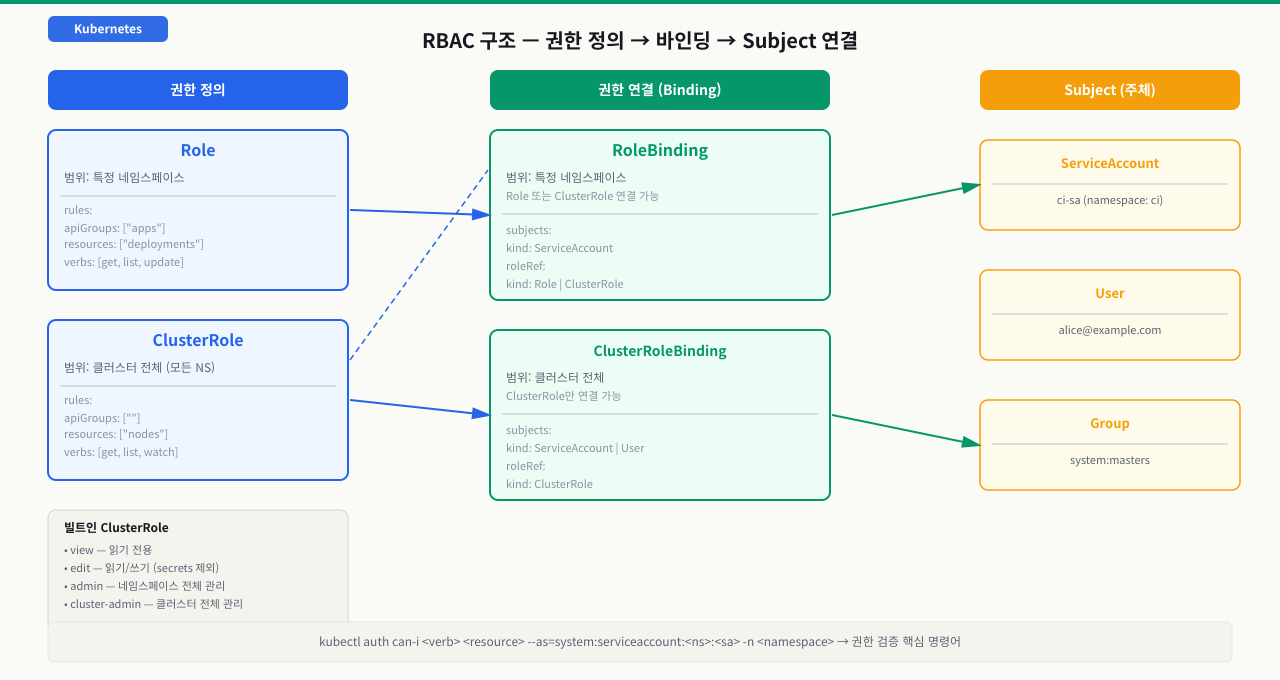
파드 안에서 실행되는 배포 자동화 도구나 모니터링 에이전트는 Kubernetes API를 직접 호출해야 하는 경우가 있습니다. 그런데 이 파드에 사람 계정의 자격증명을 넣으면 보안 사고 시 피해 범위가 클러스터 전체로 확대됩니다. ServiceAccount는 파드 전용 K8s 내부 ID입니다. 필요한 권한만 Role로 정의하고 ServiceAccount에 바인딩하면, 그 파드는 설계된 동작만 수행할 수 있고 나머지는 모두 거부됩니다. 인프라를 변경해도 파드를 재배포할 필요 없이 바인딩만 수정하면 됩니다.
ServiceAccount는 파드(애플리케이션)에 할당되는 Kubernetes 내부 ID입니다. RoleBinding으로 ServiceAccount에 Role을 연결합니다.
 확대
확대
# 1. ServiceAccount 생성
apiVersion: v1
kind: ServiceAccount
metadata:
  name: ci-sa
  namespace: ci
---
# 2. CI가 production 네임스페이스의 Deployment를 관리할 Role
apiVersion: rbac.authorization.k8s.io/v1
kind: Role
metadata:
  name: deploy-manager
  namespace: production
rules:
- apiGroups: ["apps"]
  resources: ["deployments", "replicasets"]
  verbs: ["get", "list", "watch", "create", "update", "patch"]
- apiGroups: [""]
  resources: ["pods"]
  verbs: ["get", "list", "watch"]
---
# 3. ci 네임스페이스의 ci-sa에 production의 deploy-manager Role 부여
apiVersion: rbac.authorization.k8s.io/v1
kind: RoleBinding
metadata:
  name: ci-deploy-binding
  namespace: production    # 이 네임스페이스에서 권한 적용
subjects:
- kind: ServiceAccount
  name: ci-sa
  namespace: ci            # ServiceAccount가 있는 네임스페이스
roleRef:
  kind: Role
  name: deploy-manager
  apiGroup: rbac.authorization.k8s.io
운영 리소스 직접 패치
안전한 실행 조건: 변경 내용을 코드에 반영할 계획이 있고 영향 범위를 검토했을 때만 실행하세요.
실행 전 반드시 확인
- 현재 컨텍스트와 Namespace가 의도한 대상인지 확인했는가
- 운영 트래픽이나 상태 저장 데이터에 미치는 영향을 확인했는가
- 되돌릴 매니페스트, 백업, 또는 복구 절차가 준비되어 있는가
kubectl patch deployment my-app -n production위 항목을 모두 확인한 후 복사할 수 있습니다
kubectl apply -f ci-rbac.yaml

# 파드에 ServiceAccount 지정
# (지정 안 하면 네임스페이스의 default ServiceAccount 사용)
kubectl patch deployment my-app -n production \
  --type='json' \
  -p='[{"op":"add","path":"/spec/template/spec/serviceAccountName","value":"ci-sa"}]'
kubectl auth can-i: 권한 시뮬레이션
403 Forbidden이 발생했을 때, 또는 권한을 배포 전에 검증하고 싶을 때 사용합니다.
# 현재 사용자 권한 확인
kubectl auth can-i list pods -n production
# yes

# 다른 주체로 가장해서 확인 (--as)
kubectl auth can-i list pods \
  --as=system:serviceaccount:ci:ci-sa \
  -n production
# no  ← 권한 없음

# 어떤 권한이 있는지 전체 확인
kubectl auth can-i --list \
  --as=system:serviceaccount:ci:ci-sa \
  -n production
# Resources             Non-Resource URLs   Resource Names   Verbs
# deployments.apps      []                  []               [get list watch update patch]
# pods                  []                  []               [get list watch]

# 특정 동작 확인
kubectl auth can-i create deployments \
  --as=system:serviceaccount:ci:ci-sa \
  -n production
# yes

kubectl auth can-i delete nodes \
  --as=system:serviceaccount:ci:ci-sa
# no  ← 클러스터 레벨 권한 없음
실습: 읽기 전용 사용자 설정
# 읽기 전용 ServiceAccount 생성
kubectl create serviceaccount readonly-user -n rbac-demo

# 빌트인 view ClusterRole을 RoleBinding으로 연결 (네임스페이스 범위)
kubectl create rolebinding readonly-binding \
  -n rbac-demo \
  --clusterrole=view \
  --serviceaccount=rbac-demo:readonly-user

# 권한 검증
kubectl auth can-i list pods \
  --as=system:serviceaccount:rbac-demo:readonly-user \
  -n rbac-demo
# yes

kubectl auth can-i delete pods \
  --as=system:serviceaccount:rbac-demo:readonly-user \
  -n rbac-demo
# no  ← 삭제 권한 없음

kubectl auth can-i list pods \
  --as=system:serviceaccount:rbac-demo:readonly-user \
  -n production
# no  ← 다른 네임스페이스 접근 불가
Jenkins/GitHub Actions 파이프라인이 쿠버네티스 배포 단계에서 실패합니다. 로그에 Error from server (Forbidden): deployments.apps is forbidden이 출력됩니다.
# 1단계: 에러 메시지에서 주체(Subject)와 동작 파악
# "User "system:serviceaccount:ci:jenkins-sa" cannot update resource
#  "deployments" in API group "apps" in the namespace "production""
# → 주체: ci 네임스페이스의 jenkins-sa ServiceAccount
# → 동작: production 네임스페이스의 deployments 업데이트

# 2단계: ServiceAccount 존재 여부 확인
kubectl get serviceaccount jenkins-sa -n ci
# Error from server (NotFound)  ← SA 자체가 없음!
# 또는
# NAME         SECRETS   AGE
# jenkins-sa   0         5m

# 2-1: SA가 없다면 생성
kubectl create serviceaccount jenkins-sa -n ci

# 3단계: 현재 바인딩된 권한 확인
kubectl get rolebinding,clusterrolebinding -A \
  | grep jenkins-sa
# (아무 출력 없음 — 바인딩이 없음)

# 4단계: 필요한 최소 권한 파악 후 Role 생성
cat <<EOF | kubectl apply -f -
apiVersion: rbac.authorization.k8s.io/v1
kind: Role
metadata:
  name: jenkins-deployer
  namespace: production
rules:
- apiGroups: ["apps"]
  resources: ["deployments"]
  verbs: ["get", "list", "update", "patch"]
- apiGroups: [""]
  resources: ["pods", "pods/log"]
  verbs: ["get", "list", "watch"]
- apiGroups: [""]
  resources: ["configmaps"]
  verbs: ["get", "list"]
---
apiVersion: rbac.authorization.k8s.io/v1
kind: RoleBinding
metadata:
  name: jenkins-deploy-binding
  namespace: production
subjects:
- kind: ServiceAccount
  name: jenkins-sa
  namespace: ci
roleRef:
  kind: Role
  name: jenkins-deployer
  apiGroup: rbac.authorization.k8s.io
EOF

# 5단계: 권한 검증
kubectl auth can-i update deployments \
  --as=system:serviceaccount:ci:jenkins-sa \
  -n production
# yes  ← 이제 가능

kubectl auth can-i delete deployments \
  --as=system:serviceaccount:ci:jenkins-sa \
  -n production
# no  ← 삭제는 불가 (최소 권한 원칙)

# 6단계: Kubeconfig에 ServiceAccount 토큰 설정 (Jenkins)
# K8s 1.24+ 에서는 토큰을 수동으로 생성해야 함
cat <<EOF | kubectl apply -f -
apiVersion: v1
kind: Secret
metadata:
  name: jenkins-sa-token
  namespace: ci
  annotations:
    kubernetes.io/service-account.name: jenkins-sa
type: kubernetes.io/service-account-token
EOF

TOKEN=$(kubectl get secret jenkins-sa-token -n ci \
  -o jsonpath='{.data.token}' | base64 -d)

# Jenkins에 이 TOKEN 값을 Kubernetes credential로 등록
echo "Token: ${TOKEN:0:30}..."
- kubectl auth can-i <verb> <resource> --as=system:serviceaccount:<ns>:<sa>로 권한 확인 먼저 — yes이면 RoleBinding 정상, no이면 Role에 해당 verb/resource 누락 또는 RoleBinding 미생성
- 403 Forbidden 에러 메시지 기준: "cannot <verb> resource" 부분이 Role에 추가해야 할 정확한 권한. rules[].verbs에 해당 동사 추가, rules[].resources에 해당 리소스 추가
- kubectl get rolebinding -n <ns>로 바인딩이 있어도 권한이 없으면 → RoleBinding의 subjects 항목에서 name과 namespace가 실제 ServiceAccount와 일치하는지 확인. 대소문자 오타가 흔한 원인
예방 패턴: CI/CD 파이프라인 구성 시 ServiceAccount, Role, RoleBinding을 GitOps 방식으로 관리하고, 배포 전에 kubectl auth can-i --list로 권한을 검증하는 단계를 파이프라인에 포함하세요. 절대로 cluster-admin을 임시방편으로 사용하지 마세요.
심화 — auth can-i가 yes인데 왜 거부될까
심화: RBAC는 요청 파이프라인의 한 관문일 뿐 — 인증·인가·어드미션
403을 무조건 RBAC 문제로만 보면, Role을 다 고쳤는데도 요청이 막히는 상황에서 길을 잃습니다. API 서버에 도착한 요청은 세 관문을 순서대로 지납니다.
- 인증(Authentication): 너는 누구인가. 토큰·인증서로 주체(User·Group·ServiceAccount)를 확정합니다. 실패하면 401.
- 인가(Authorization, RBAC): 그 주체가 이 리소스에 이 동작을 할 수 있는가.
kubectl auth can-i가 검사하는 단계가 바로 여기입니다. 실패하면is forbidden: User ... cannot ...형태의 403. - 어드미션(Admission): 통과한 요청의 오브젝트 내용을 검사·변형합니다. 뮤테이팅 웹훅이 먼저 손대고, 검증 웹훅(OPA Gatekeeper·Kyverno)과 빌트인 검증(PodSecurity·ResourceQuota·LimitRange)이 내용을 근거로 거부할 수 있습니다.
여기서 두 가지가 따라옵니다. 첫째, RBAC는 더하기만 있는 모델입니다 — 명시적 deny 규칙이 없어 권한을 빼서 막을 수 없고, 안 주는 방식으로만 제한합니다. 둘째, auth can-i는 인가 단계만 본다는 점입니다. 그래서 can-i가 yes여도 뒤이은 어드미션 관문이 오브젝트를 거부하면 apply는 실패하고, 반대로 can-i가 no이면 그건 언제나 RBAC 문제입니다. 어느 관문이 막았는지를 에러 메시지로 구분하는 것이 디버깅의 절반입니다.
상황: RBAC를 제대로 설정해 kubectl auth can-i create deployments -n production이 yes를 반환합니다. 그런데 실제로 kubectl apply를 하면 오브젝트가 거부됩니다. 팀은 습관적으로 Role에 verb를 더 추가했지만 아무 변화가 없습니다.
원인: 거부가 RBAC(인가)가 아니라 그다음 어드미션 단계에서 일어났습니다. 에러 메시지가 is forbidden: User ... cannot ...가 아니라 admission webhook ... denied the request 또는 violates PodSecurity ...라면, 요청은 인가를 통과했고 검증 웹훅·PodSecurity가 오브젝트 내용을 문제 삼은 것입니다. 권한을 아무리 넓혀도 관문 자체가 다르므로 풀리지 않습니다.
진단: 에러 문구의 형태를 봅니다. cannot ... resource 형태면 RBAC, admission webhook ... denied 또는 violates PodSecurity 형태면 어드미션입니다. 어떤 정책이 걸었는지는 kubectl get validatingwebhookconfigurations와 네임스페이스의 PodSecurity 레이블(kubectl get ns production --show-labels)로 좁힙니다.
해결: 어드미션이 요구하는 대로 오브젝트 스펙을 고칩니다 — 예를 들어 Kyverno가 리소스 제한을 강제하면 resources.limits를 채우고, PodSecurity restricted면 runAsNonRoot·seccompProfile 같은 securityContext를 맞춥니다. RBAC 권한은 그대로 두고, 막은 관문에 맞는 수정을 하는 것이 정답입니다. can-i는 인가만 보증한다는 사실을 기억하면 이런 오진을 피할 수 있습니다(ServiceAccount를 이용한 컨테이너 내부의 API 서버 안전 통신).
시나리오: 멀티팀 클러스터에서 팀별 네임스페이스 권한 설계
스타트업이 성장해 팀이 세 개(frontend, backend, data)로 분리됐습니다. 각 팀은 자신의 네임스페이스만 관리할 수 있어야 하고, 서로의 작업을 방해할 수 없어야 합니다.
# 1단계: 팀별 네임스페이스 생성
for team in frontend backend data; do
  kubectl create namespace $team
done

# 2단계: 팀별 ServiceAccount 생성
for team in frontend backend data; do
  kubectl create serviceaccount "${team}-admin" -n $team
done

# 3단계: 각 팀에 자신의 네임스페이스 admin 권한 부여
# 빌트인 admin ClusterRole을 각 네임스페이스 내에서만 적용
for team in frontend backend data; do
  kubectl create rolebinding "${team}-admin-binding" \
    -n $team \
    --clusterrole=admin \
    --serviceaccount="${team}:${team}-admin"
done

# 4단계: 팀 간 격리 검증
kubectl auth can-i create deployments \
  --as=system:serviceaccount:frontend:frontend-admin \
  -n frontend
# yes ← 자신의 네임스페이스

kubectl auth can-i create deployments \
  --as=system:serviceaccount:frontend:frontend-admin \
  -n backend
# no ← 다른 팀 네임스페이스 접근 불가

# 5단계: 공통 읽기 권한 (팀 간 파드 상태 공유 필요 시)
# 모든 팀이 다른 팀의 파드를 읽기 전용으로 볼 수 있도록
for team in frontend backend data; do
  for target in frontend backend data; do
    if [ "$team" != "$target" ]; then
      kubectl create rolebinding "${team}-view-${target}" \
        -n $target \
        --clusterrole=view \
        --serviceaccount="${team}:${team}-admin"
    fi
  done
done

# 6단계: ResourceQuota로 팀별 리소스 제한
for team in frontend backend data; do
  cat <<EOF | kubectl apply -f -
apiVersion: v1
kind: ResourceQuota
metadata:
  name: team-quota
  namespace: $team
spec:
  hard:
    pods: "20"
    requests.cpu: "4"
    requests.memory: "8Gi"
    limits.cpu: "8"
    limits.memory: "16Gi"
EOF
done
실무 포인트: 직접 Role을 만드는 것보다 빌트인 ClusterRole(view, edit, admin)을 RoleBinding으로 네임스페이스 범위에서 사용하는 것이 관리가 간편합니다. 새 팀원 온보딩, 서비스 계정 추가 등 반복 작업은 스크립트화해두면 휴먼 에러를 줄일 수 있습니다.
핵심 요약
| 리소스 | 범위 | 용도 |
|---|---|---|
| Role | 네임스페이스 | 특정 네임스페이스 리소스 권한 정의 |
| ClusterRole | 클러스터 전체 | 모든 네임스페이스 또는 클러스터 리소스 권한 정의 |
| RoleBinding | 네임스페이스 | Subject에 Role/ClusterRole 연결 (네임스페이스 내) |
| ClusterRoleBinding | 클러스터 전체 | Subject에 ClusterRole 연결 (전체 범위) |
| 디버깅 명령어 | 용도 |
|---|---|
kubectl auth can-i <verb> <resource> -n <ns> | 현재 사용자 권한 확인 |
kubectl auth can-i --list --as=<subject> -n <ns> | 특정 주체 전체 권한 나열 |
kubectl get rolebinding,clusterrolebinding -A | grep <name> | 바인딩 찾기 |
kubectl describe rolebinding <name> -n <ns> | 바인딩 상세 확인 |
실습 네임스페이스 및 ServiceAccount 생성
kubectl create namespace rbac-demo
kubectl create serviceaccount readonly-user -n rbac-demo예상 출력
namespace/rbac-demo created
serviceaccount/readonly-user created
빌트인 view ClusterRole을 RoleBinding으로 연결
kubectl create rolebinding readonly-binding -n rbac-demo --clusterrole=view --serviceaccount=rbac-demo:readonly-user예상 출력
rolebinding.rbac.authorization.k8s.io/readonly-binding created
읽기 권한 검증
kubectl auth can-i list pods --as=system:serviceaccount:rbac-demo:readonly-user -n rbac-demo
kubectl auth can-i delete pods --as=system:serviceaccount:rbac-demo:readonly-user -n rbac-demo예상 출력
yes
no
다른 네임스페이스 접근 차단 확인
kubectl auth can-i list pods --as=system:serviceaccount:rbac-demo:readonly-user -n kube-system예상 출력
no
실습 리소스 정리
kubectl delete namespace rbac-demo예상 출력
namespace "rbac-demo" deleted
명령어·단축키 빠른 참조
이 모듈에서 권한을 시뮬레이션하고 403을 디버깅할 때 쓴 kubectl 명령을 모았습니다.
| 명령어/단축키 | 용도 | 자주 쓰는 예 |
|---|---|---|
kubectl auth can-i | 특정 동작 허용 여부(yes/no) | kubectl auth can-i create pods --as=system:serviceaccount:ci:ci-sa -n production |
kubectl auth can-i --list | 주체의 전체 실효 권한 나열 | kubectl auth can-i --list --as=system:serviceaccount:ci:ci-sa -n production |
kubectl auth can-i '*' '*' | 내 권한 전체 범위 확인 | kubectl auth can-i '*' '*' --all-namespaces |
kubectl get rolebinding | 바인딩 존재·주체 매핑 조회 | kubectl get rolebinding,clusterrolebinding -A | grep <sa> |
kubectl describe rolebinding | 바인딩의 subjects·roleRef 확인 | kubectl describe rolebinding X -n <ns> |
kubectl describe clusterrole | 빌트인 롤의 권한 내용 확인 | kubectl describe clusterrole view (읽기 전용) |
kubectl create rolebinding | 빌트인 ClusterRole 재사용 | kubectl create rolebinding ro --clusterrole=view --serviceaccount=<ns>:<sa> |
kubectl create serviceaccount | 전용 SA 생성 | kubectl create serviceaccount ci-sa -n ci |
kubectl get clusterroles | 재사용할 빌트인 롤 탐색 | kubectl get clusterroles | grep -v system |
kubectl get ns --show-labels | 어드미션(PodSecurity) 경계 확인 | kubectl get ns production --show-labels |
관련 모듈로 더 깊이:
- ServiceAccount를 이용한 컨테이너 내부의 API 서버 안전 통신 — RoleBinding의 주체(subject)가 되는 파드 신원과 토큰 마운트 구조
- Namespace를 활용한 여러 개발팀 간 리소스 분할 운영 — Role의 권한 경계와 ClusterRole의 차이를 가르는 네임스페이스 범위
- NetworkPolicy를 활용한 특정 파드 간 통신 차단 및 제한 — 권한(누가 무엇을)에 더해 네트워크 경계(누가 누구와)로 보안을 이중화하는 법
- 리눅스 다중 사용자 권한 분리와 그룹 설정 실무 — 접근 통제의 OS 버전 — 리눅스 사용자·그룹으로 권한 주체를 나누는 모델 (Linux 트랙)
다음 모듈 serviceaccount에서는 파드가 Kubernetes API를 호출할 때 사용하는 ServiceAccount의 구조와 토큰 마운트를 다룹니다. IRSA(IAM Roles for Service Accounts)로 AWS 리소스에 안전하게 접근하고, automountServiceAccountToken 비활성화로 보안을 강화하는 실무 패턴을 익힙니다.