개발팀은 '웹앱 하나 배포'만 요청하고 싶은데 플랫폼팀은 Deployment, Service, Ingress YAML을 매번 설명하고 있습니다. 복잡한 운영 규칙을 더 높은 수준의 API로 감싸면 사용자는 필요한 의도만 선언할 수 있습니다. Custom Resource는 Kubernetes를 조직의 플랫폼 API로 확장하는 방법입니다.
CRD와 Custom Resource — Kubernetes API 확장하기
쿠버네티스를 쓰다 보면 표준 리소스만으로는 표현하기 어려운 도메인 개념들이 생깁니다. TLS 인증서 관리, 데이터베이스 클러스터, 메시지 큐 토픽 같은 것들입니다. CRD는 Kubernetes API 서버 자체를 확장해서 이런 도메인 객체를 kubectl get certificate, kubectl get postgrescluster 처럼 표준 명령어로 다룰 수 있게 만듭니다. kubectl이 알고 있는 API가 늘어나는 것이니, 인프라 추상화 수준이 한 단계 올라가는 것입니다. cert-manager는 이 메커니즘의 교과서적인 사례로, 수십만 개 클러스터에서 TLS 인증서를 Certificate 리소스 하나로 관리합니다.
Kubernetes API 확장의 핵심인 CRD를 직접 정의하고 커스텀 리소스를 kubectl로 다루는 방법을 익힙니다. cert-manager의 Certificate 리소스를 통해 실제 프로덕션 CRD가 어떻게 설계되는지 이해합니다.
- 1CRD(Custom Resource Definition) 스키마를 apiVersion, spec, validation으로 정의할 수 있다
- 2kubectl create/get/describe/delete로 커스텀 리소스를 CRUD할 수 있다
- 3OpenAPI v3 스키마의 required, enum, format으로 입력값을 검증할 수 있다
- 4status 서브리소스로 spec(선언)과 status(현재 상태)를 분리할 수 있다
- 5cert-manager Certificate 리소스의 실제 예시를 이해할 수 있다
- 6storage 버전과 conversion으로 CRD 버전을 관리할 수 있다
kubectl로 클러스터에 접근할 수 있으면 됩니다. cert-manager 설치는 선택사항이며, CRD 정의와 커스텀 리소스 CRUD는 cert-manager 없이도 직접 만든 CRD로 실습합니다.
kubectl cluster-infokubectl create namespace crd-labkubectl get crd | head -20kubectl apply -f https://github.com/cert-manager/cert-manager/releases/download/v1.14.0/cert-manager.yaml현재 context·namespace가 crd-lab인지 확인한 뒤에만 kubectl delete namespace crd-lab 실행. CRD 삭제는 이 실습에서 만든 webapps.example.com만 목록·소유자를 확인한 뒤 별도 승인하여 실행
CRD 구조 — Kubernetes API 확장의 원리
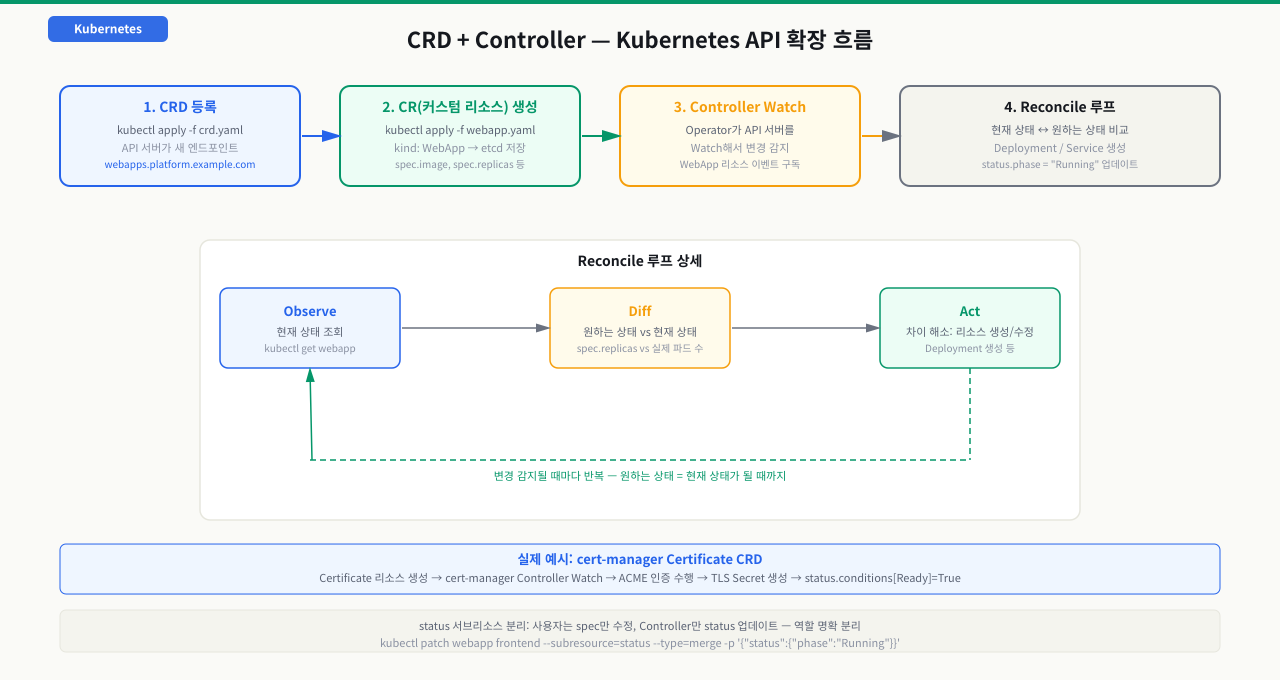
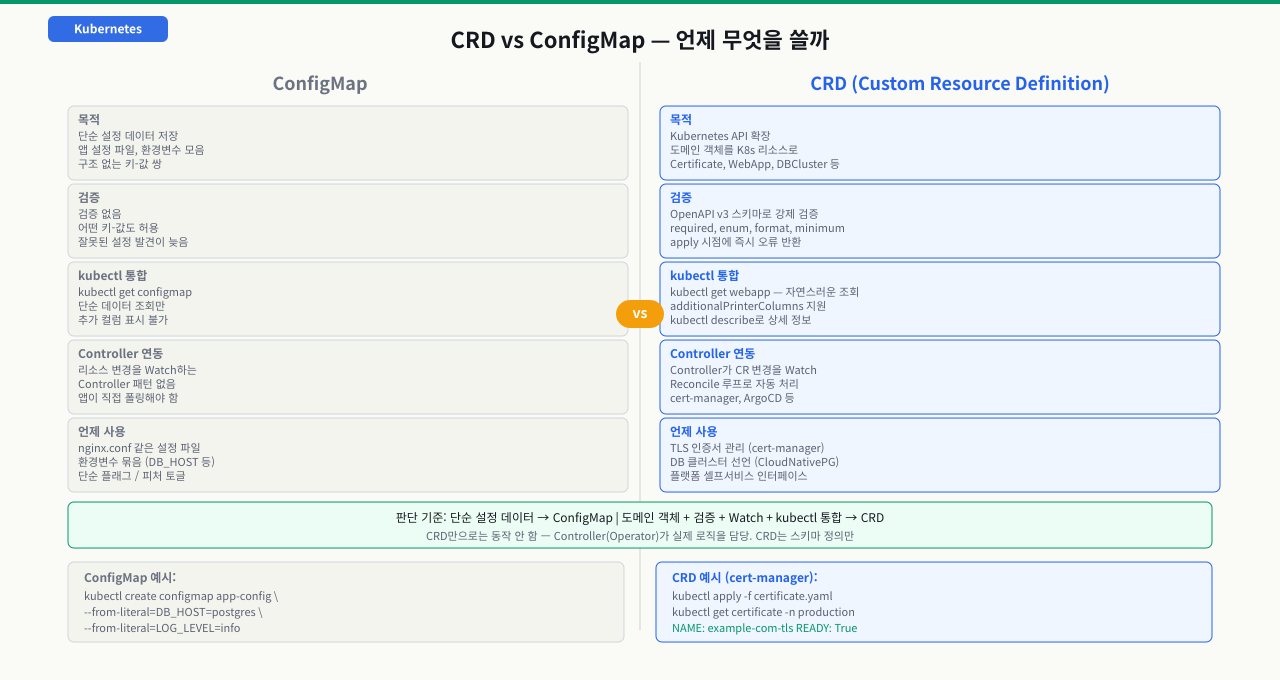
플랫폼팀이 개발팀에게 "TLS 인증서가 필요하면 이 YAML 하나 작성하세요"라고 안내할 수 있는 것은 CRD 덕분입니다. cert-manager의 Certificate 리소스처럼, 복잡한 운영 절차를 단일 오브젝트로 추상화하면 사용자는 내부 구현 없이 의도만 선언할 수 있습니다. CRD가 없다면 Kubernetes의 표준 리소스(Pod, Deployment)로만 표현할 수 없는 도메인 개념을 쉘 스크립트나 외부 도구로 처리해야 합니다. 이는 클러스터 상태가 etcd 밖에 분산되어 감사와 추적이 어려워지는 원인이 됩니다. 그래서 CRD는 Kubernetes를 조직의 플랫폼 API로 확장하는 표준 방법입니다.
 확대
확대
 확대
확대
CRD 기본 구조
# crd-webapp.yaml
apiVersion: apiextensions.k8s.io/v1
kind: CustomResourceDefinition
metadata:
  # CRD 이름: <plural>.<group> 형식이 규칙
  name: webapps.platform.example.com
spec:
  group: platform.example.com       # API 그룹 (보통 회사 도메인 역순)
  names:
    kind: WebApp                    # 리소스 타입 이름 (CamelCase)
    plural: webapps                 # URL에 사용되는 복수형
    singular: webapp                # kubectl에서 사용되는 단수형
    shortNames:                     # 축약형 (선택)
      - wa
  scope: Namespaced                 # Namespaced | Cluster
  versions:
    - name: v1alpha1
      served: true                  # API 서버가 이 버전을 서빙할지 여부
      storage: true                 # etcd에 저장되는 버전 (하나만 true)
      schema:
        openAPIV3Schema:
          type: object
          properties:
            spec:
              type: object
              required:
                - image
                - port
              properties:
                image:
                  type: string
                  description: "컨테이너 이미지 (repository:tag)"
                port:
                  type: integer
                  minimum: 1
                  maximum: 65535
                replicas:
                  type: integer
                  default: 1
                  minimum: 1
                  maximum: 10
                env:
                  type: array
                  items:
                    type: object
                    required: ["name", "value"]
                    properties:
                      name:
                        type: string
                      value:
                        type: string
            status:
              type: object
              properties:
                phase:
                  type: string
                  enum: ["Pending", "Running", "Failed"]
                availableReplicas:
                  type: integer
                message:
                  type: string
      # status 서브리소스 활성화 (Controller가 status만 별도 업데이트 가능)
      subresources:
        status: {}
      # kubectl get webapps 출력에 표시될 추가 컬럼
      additionalPrinterColumns:
        - name: Image
          type: string
          jsonPath: .spec.image
        - name: Replicas
          type: integer
          jsonPath: .spec.replicas
        - name: Phase
          type: string
          jsonPath: .status.phase
        - name: Age
          type: date
          jsonPath: .metadata.creationTimestamp
CRD 적용 및 확인
# CRD 적용
kubectl apply -f crd-webapp.yaml
# customresourcedefinition.apiextensions.k8s.io/webapps.platform.example.com created

# CRD 등록 확인
kubectl get crd webapps.platform.example.com
# NAME                              CREATED AT
# webapps.platform.example.com      2026-05-16T10:00:00Z

# API 그룹 확인
kubectl api-resources | grep platform.example.com
# webapps   wa   platform.example.com/v1alpha1   true   WebApp

# API 버전 확인
kubectl api-versions | grep platform
# platform.example.com/v1alpha1
- kubectl api-resources | grep <group> 에서 새 리소스 타입이 목록에 나오는지 먼저 확인 — 나오지 않으면 CRD 적용이 아직 안 된 것으로, kubectl get crd로 등록 여부 확인
- kubectl get crd <name> -o yaml | grep -A5 "conditions:" 출력에서 Established: True여야 API 서버에서 사용 가능 — False이면 openAPIV3Schema 타입 오류 확인 필요
- kubectl apply -f <cr>.yaml 후 "no kind registered" 오류가 나면 → CRD와 CR의 apiVersion group명 불일치. kubectl api-versions | grep <group>으로 실제 등록된 group명과 대조
CRD 한 장이 API를 확장하는 실제 순서 — 등록부터 저장까지 6단계
kubectl apply -f crd.yaml 한 번으로 갑자기 kubectl get webapp이 동작하게 되는데, 그 사이 API Server 안에서 무슨 일이 일어나 새 종류가 "생겨나는지"는 잘 안 보입니다. CRD는 파드를 띄우는 게 아니라 API 표면 자체를 넓히는 작업입니다. 이 흐름을 알면 no kind ... is registered, 스키마 거부, 만들었는데 아무 일도 없음 같은 증상을 단계로 좁힐 수 있습니다. 앞의 reconcile 루프가 "동작"을 다룬다면, 여기서는 그 앞단인 "API 확장"만 떼어 봅니다.
[관리자]  kubectl apply -f crd-webapp.yaml
   │
   ① CRD 등록           (apiextensions API가 CustomResourceDefinition 객체를 받아 저장)
   │
   ② API 표면 확장       (API Server가 /apis/platform.example.com/v1alpha1/webapps 를 동적 등록)
   │    → CRD conditions에 Established: True — 이제 kubectl이 새 종류를 인식
   │
[개발자]  kubectl apply -f webapp.yaml  (kind: WebApp)
   │
   ③ 종류 확인           (API Server가 apiVersion·kind로 방금 등록된 타입을 조회)
   │
   ④ 스키마 검증          (openAPIV3Schema로 required·타입·min/max·enum 검사 + default 적용)
   │
   ⑤ etcd 저장           (storage: true 버전으로 직렬화해 영속화 — 이제 kubectl get 가능)
   │
   ⑥ 컨트롤러 Watch       (Operator가 이 CR의 Added를 받아 실제 조치 시작 — 없으면 데이터만 남음)
   ▼
[결과]  kubectl get webapp 로 표준 리소스처럼 다뤄짐
각 단계에서 무슨 일이 일어나고, 막히면 어떤 증상인가:
| 단계 | 하는 일 | 여기서 막히면 |
|---|---|---|
| ① CRD 등록 | apiextensions.k8s.io가 CRD 객체(그룹·버전·names·scope·스키마)를 받아 저장 | CRD YAML 자체 오류(스키마 타입 틀림)면 다음 단계로 못 넘어감 |
| ② API 표면 확장 | API Server가 /apis/<group>/<version>/<plural> 엔드포인트를 열고 conditions에 Established: True | Established가 False면 스키마 검증 실패 — kubectl get crd -o yaml의 conditions 메시지 확인 |
| ③ 종류 확인 | CR을 apply하면 API Server가 apiVersion·kind로 등록된 타입을 조회 | 그룹·버전 오타면 no kind "WebApp" is registered — CRD group과 CR apiVersion 대조 |
| ④ 스키마 검증 | openAPIV3Schema로 required 누락·타입·범위·enum을 검사하고 default를 채움 | 위반이면 spec.port: Invalid value...로 즉시 거부(etcd에 안 들어감) |
| ⑤ etcd 저장 | storage: true인 버전으로 직렬화해 etcd에 영속화 | storage 버전이 여러 개인데 conversion webhook이 없으면 버전 변환 실패 |
| ⑥ 컨트롤러 Watch | 저장된 CR을 Operator가 watch로 받아 실제 리소스를 만듦 | Controller가 없으면 CR은 저장만 되고 아무 일도 안 일어남(빈 껍데기) |
즉 CRD는 ①②(API에 새 종류 추가)까지가 자기 역할이고, CR을 다룰 수 있게 되는 건 ③④⑤, 실제 동작은 ⑥의 Controller 몫입니다. 그래서 증상이 이렇게 갈립니다 — "kubectl이 내 리소스를 모른다"면 ①②(등록·Established), "적용이 거부된다"면 ④(스키마 위반), "만들었는데 아무 일도 없다"면 ⑥(Controller 부재). 이 셋을 구분하는 것이 CRD 트러블슈팅의 출발점입니다.
커스텀 리소스 CRUD — kubectl로 도메인 객체 다루기
CRD를 정의했는데 커스텀 리소스를 어떻게 생성하고 조회하는지 모르면 실습에서 바로 막힙니다. 표준 리소스(Pod, Service)는 kubectl이 기본으로 알고 있지만, 커스텀 리소스는 CRD가 클러스터에 등록된 후에야 kubectl이 인식합니다. CRD 적용 순서를 잘못 맞추면 "no kind 'WebApp' is registered" 오류가 나는데, 이 관계를 이해해야 Operator 패턴의 전체 흐름을 파악할 수 있습니다. CRD 등록 후에는 get, describe, apply, delete 등 모든 kubectl 명령이 표준 리소스와 동일하게 동작하기 때문에, 기존 kubectl 사용법 그대로 커스텀 리소스를 다룰 수 있습니다.
커스텀 리소스 생성
# webapp-frontend.yaml
apiVersion: platform.example.com/v1alpha1
kind: WebApp
metadata:
  name: frontend
  namespace: crd-lab
spec:
  image: "nginx:1.25-alpine"
  port: 80
  replicas: 2
  env:
    - name: API_URL
      value: "http://backend:8080"
    - name: NODE_ENV
      value: "production"
kubectl apply -f webapp-frontend.yaml
# webapp.platform.example.com/frontend created

# 스키마 검증 확인 (잘못된 값)
cat > webapp-invalid.yaml << 'EOF'
apiVersion: platform.example.com/v1alpha1
kind: WebApp
metadata:
  name: invalid
  namespace: crd-lab
spec:
  port: 99999    # maximum: 65535 초과
  replicas: 20   # maximum: 10 초과
  # image 누락 (required 필드)
EOF

kubectl apply -f webapp-invalid.yaml
# The WebApp "invalid" is invalid:
# * spec.image: Required value
# * spec.port: Invalid value: 99999: spec.port in body should be less than or equal to 65535
# * spec.replicas: Invalid value: 20: spec.replicas in body should be less than or equal to 10
커스텀 리소스 조회
# 목록 조회 (additionalPrinterColumns 활용)
kubectl get webapps -n crd-lab
# NAME       IMAGE               REPLICAS   PHASE     AGE
# frontend   nginx:1.25-alpine   2          <none>    30s

# 상세 조회
kubectl describe webapp frontend -n crd-lab
# Name:         frontend
# Namespace:    crd-lab
# Labels:       <none>
# API Version:  platform.example.com/v1alpha1
# Kind:         WebApp
# Spec:
#   Image:     nginx:1.25-alpine
#   Port:      80
#   Replicas:  2
#   Env:
#     Name:   API_URL
#     Value:  http://backend:8080
# Status:
#   <nil>      ← Controller 없으면 status는 비어 있음

# YAML로 전체 출력
kubectl get webapp frontend -n crd-lab -o yaml

# 축약형 사용
kubectl get wa -n crd-lab
status 업데이트 (Controller 역할 시뮬레이션)
# status 서브리소스를 활성화했을 때 status만 별도 업데이트
# 실제 Controller는 client-go의 Status().Update()를 사용
# kubectl patch로 직접 테스트할 수 있음

kubectl patch webapp frontend -n crd-lab \
  --subresource=status \
  --type=merge \
  -p '{"status":{"phase":"Running","availableReplicas":2,"message":"All pods running"}}'

# 결과 확인
kubectl get webapp frontend -n crd-lab
# NAME       IMAGE               REPLICAS   PHASE     AGE
# frontend   nginx:1.25-alpine   2          Running   2m
커스텀 리소스 수정 및 삭제
# 수정 (spec 변경)
kubectl patch webapp frontend -n crd-lab \
  --type=merge \
  -p '{"spec":{"replicas":3}}'

# 또는 직접 편집
kubectl edit webapp frontend -n crd-lab

# 삭제
kubectl delete webapp frontend -n crd-lab
# webapp.platform.example.com "frontend" deleted
cert-manager Certificate 리소스 — 실제 프로덕션 CRD 사례
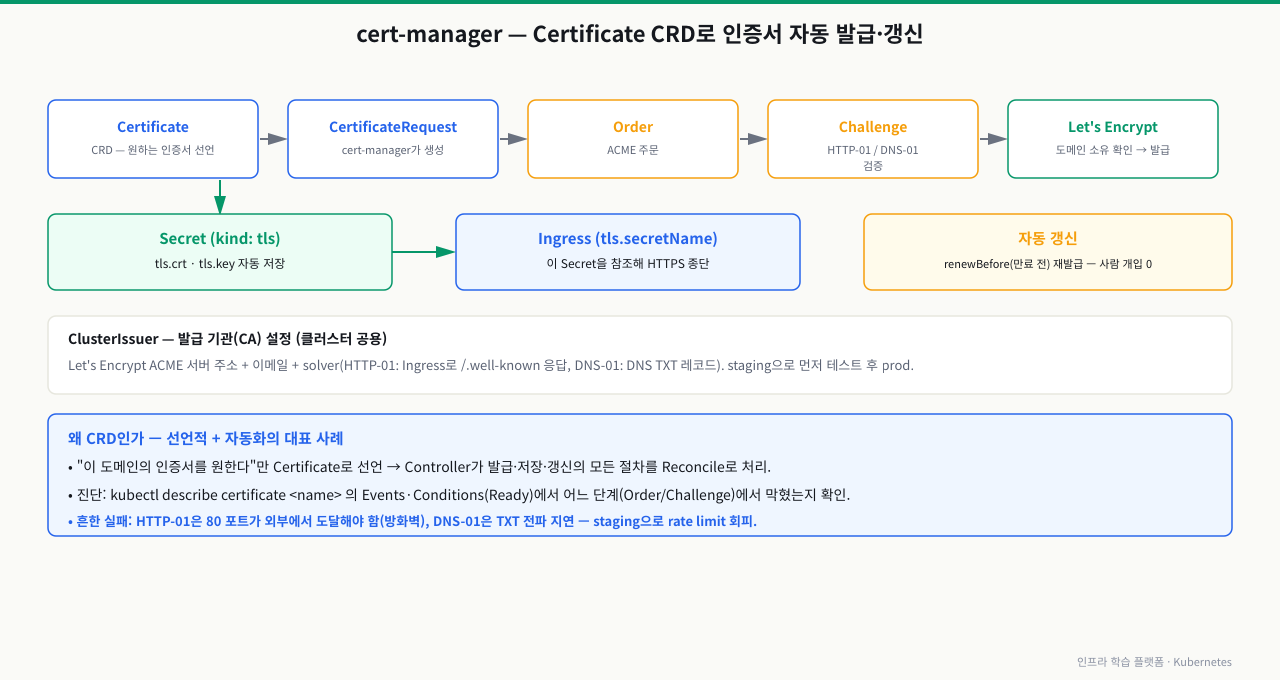
Let's Encrypt 인증서가 만료됐다는 알림을 받고 수동으로 갱신하다가 실수로 서비스를 잠깐 중단시킨 경험이 있다면, cert-manager가 왜 필요한지 바로 납득할 수 있습니다. cert-manager는 TLS 인증서 발급과 90일 주기 자동 갱신을 Certificate 리소스 하나로 선언적으로 처리합니다. 전 세계 수십만 클러스터에서 사용되는 이 도구가 CRD + Operator 패턴의 대표 사례입니다. cert-manager의 코드를 보지 않아도 kubectl get certificate로 발급 상태를 확인하고, YAML 한 파일로 인증서를 선언할 수 있다는 것이 CRD 추상화의 가치를 보여줍니다.
 확대
확대
cert-manager의 CRD 목록
# cert-manager 설치 후 생성되는 CRD들
kubectl get crd | grep cert-manager.io
# NAME                                  CREATED AT
# certificaterequests.cert-manager.io   2026-05-16T09:00:00Z
# certificates.cert-manager.io          2026-05-16T09:00:00Z
# clusterissuers.cert-manager.io        2026-05-16T09:00:00Z
# issuers.cert-manager.io               2026-05-16T09:00:00Z
# orders.acme.cert-manager.io           2026-05-16T09:00:00Z
# challenges.acme.cert-manager.io       2026-05-16T09:00:00Z
ClusterIssuer 설정 (Let's Encrypt)
# cluster-issuer-prod.yaml
apiVersion: cert-manager.io/v1
kind: ClusterIssuer
metadata:
  name: letsencrypt-prod
spec:
  acme:
    server: https://acme-v02.api.letsencrypt.org/directory
    email: admin@example.com
    privateKeySecretRef:
      name: letsencrypt-prod-private-key
    solvers:
      - http01:
          ingress:
            class: nginx
Certificate 리소스 생성
# certificate-example.yaml
apiVersion: cert-manager.io/v1
kind: Certificate
metadata:
  name: example-com-tls
  namespace: production
spec:
  # 발급된 인증서가 저장될 Secret 이름
  secretName: example-com-tls-secret
  # 어떤 Issuer를 사용할지
  issuerRef:
    name: letsencrypt-prod
    kind: ClusterIssuer
    group: cert-manager.io
  # 인증서에 포함될 도메인
  dnsNames:
    - example.com
    - www.example.com
    - api.example.com
  # 갱신 기간 (만료 30일 전 자동 갱신)
  renewBefore: 720h    # 30일
  duration: 2160h      # 90일 (Let's Encrypt 기본)
발급 상태 확인
kubectl apply -f certificate-example.yaml

# Certificate 상태 확인
kubectl get certificate example-com-tls -n production
# NAME               READY   SECRET                   AGE
# example-com-tls    True    example-com-tls-secret   5m

# 상세 상태 (Conditions 확인)
kubectl describe certificate example-com-tls -n production
# Status:
#   Conditions:
#     Last Transition Time:  2026-05-16T10:00:00Z
#     Message:               Certificate is up to date and has not expired
#     Observed Generation:   1
#     Reason:                Ready
#     Status:                True
#     Type:                  Ready
#   Not After:               2026-08-14T10:00:00Z
#   Not Before:              2026-05-16T10:00:00Z
#   Renewal Time:            2026-07-15T10:00:00Z  ← 자동 갱신 예정 시각

# 생성된 Secret (TLS 인증서 파일)
kubectl get secret example-com-tls-secret -n production
# NAME                     TYPE                DATA   AGE
# example-com-tls-secret   kubernetes.io/tls   3      5m

# Ingress에서 TLS 참조
# spec.tls[].secretName: example-com-tls-secret
CRD 스키마 복잡성 — 실제 Certificate CRD 일부
# cert-manager의 Certificate CRD 스키마 확인 (매우 상세함)
kubectl get crd certificates.cert-manager.io -o yaml | \
  python3 -c "
import sys, yaml, json
d = yaml.safe_load(sys.stdin)
spec_props = d['spec']['versions'][0]['schema']['openAPIV3Schema']['properties']['spec']['properties']
print('Certificate spec의 주요 필드:')
for key in list(spec_props.keys())[:10]:
    print(f'  {key}: {spec_props[key].get(\"type\", \"object\")}')
"
# Certificate spec의 주요 필드:
#   commonName: string
#   dnsNames: array
#   duration: string
#   emailAddresses: array
#   encodeUsagesInRequest: boolean
#   ipAddresses: array
#   isCA: boolean
#   issuerRef: object
#   keystores: object
#   literalSubject: string
실습 — 커스텀 리소스 CRUD 전체 흐름
1단계: CRD 정의 파일 생성
mkdir -p ~/crd-lab && cd ~/crd-lab

cat > crd-webapp.yaml << 'EOF'
apiVersion: apiextensions.k8s.io/v1
kind: CustomResourceDefinition
metadata:
  name: webapps.platform.example.com
spec:
  group: platform.example.com
  names:
    kind: WebApp
    plural: webapps
    singular: webapp
    shortNames:
      - wa
  scope: Namespaced
  versions:
    - name: v1alpha1
      served: true
      storage: true
      schema:
        openAPIV3Schema:
          type: object
          properties:
            spec:
              type: object
              required:
                - image
                - port
              properties:
                image:
                  type: string
                port:
                  type: integer
                  minimum: 1
                  maximum: 65535
                replicas:
                  type: integer
                  default: 1
                  minimum: 1
                  maximum: 10
            status:
              type: object
              properties:
                phase:
                  type: string
                  enum: ["Pending", "Running", "Failed"]
                availableReplicas:
                  type: integer
      subresources:
        status: {}
      additionalPrinterColumns:
        - name: Image
          type: string
          jsonPath: .spec.image
        - name: Phase
          type: string
          jsonPath: .status.phase
        - name: Age
          type: date
          jsonPath: .metadata.creationTimestamp
EOF

kubectl apply -f crd-webapp.yaml
2단계: 커스텀 리소스 생성 및 검증 테스트
# 올바른 리소스
kubectl apply -f - << 'EOF'
apiVersion: platform.example.com/v1alpha1
kind: WebApp
metadata:
  name: my-frontend
  namespace: crd-lab
spec:
  image: "nginx:1.25"
  port: 80
  replicas: 2
EOF

# 스키마 위반 테스트 (오류 확인)
kubectl apply -f - << 'EOF'
apiVersion: platform.example.com/v1alpha1
kind: WebApp
metadata:
  name: bad-webapp
  namespace: crd-lab
spec:
  port: 99999
EOF
# The WebApp "bad-webapp" is invalid:
# * spec.image: Required value
# * spec.port: Invalid value: 99999: ...should be less than or equal to 65535
3단계: CRUD 실습
# 조회
kubectl get wa -n crd-lab
kubectl describe webapp my-frontend -n crd-lab

# status 업데이트
kubectl patch webapp my-frontend -n crd-lab \
  --subresource=status \
  --type=merge \
  -p '{"status":{"phase":"Running","availableReplicas":2}}'

kubectl get wa -n crd-lab
# NAME          IMAGE        PHASE     AGE
# my-frontend   nginx:1.25   Running   3m

# spec 수정
kubectl patch webapp my-frontend -n crd-lab \
  --type=merge \
  -p '{"spec":{"replicas":3}}'

# 삭제
kubectl delete webapp my-frontend -n crd-lab
문제 상황
$ kubectl apply -f webapp-frontend.yaml
error: unable to recognize "webapp-frontend.yaml": \
no kind "WebApp" is registered for version "platform.example.com/v1alpha1"

# 또는
$ kubectl get webapps -n crd-lab
error: the server doesn't have a resource type "webapps"
원인 1: CRD가 아직 적용되지 않음
# CRD 존재 여부 확인
kubectl get crd | grep platform.example.com
# (출력 없음) ← CRD가 없음

# 해결: CRD를 먼저 적용
kubectl apply -f crd-webapp.yaml

# CRD 준비 상태 확인 (Established 조건이 True여야 함)
kubectl wait crd/webapps.platform.example.com \
  --for=condition=Established \
  --timeout=30s
# customresourcedefinition.apiextensions.k8s.io/webapps.platform.example.com condition met
원인 2: CRD의 validation schema 오류로 적용 실패
# CRD 자체의 상태 확인
kubectl get crd webapps.platform.example.com -o yaml | \
  grep -A 10 "conditions:"

# Established: False가 보이면 schema 오류
# status:
#   conditions:
#     - lastTransitionTime: "2026-05-16T10:00:00Z"
#       message: 'spec.versions[0].schema.openAPIV3Schema.properties[spec].properties[port]:
#         Invalid value: "string": must be integer'
#       reason: ValidationError
#       status: "False"
#       type: Established

# 해결: CRD YAML의 openAPIV3Schema type 오류 수정 후 재적용
원인 3: apiVersion 또는 group 이름 불일치
# CRD의 실제 group 확인
kubectl get crd webapps.platform.example.com -o jsonpath='{.spec.group}'
# platform.example.com

# 리소스 YAML의 apiVersion이 일치하는지 확인
# 올바름: apiVersion: platform.example.com/v1alpha1
# 틀림:   apiVersion: platform.io/v1  ← group이 다름

# 사용 가능한 API 버전 전체 목록
kubectl api-versions | grep platform
# platform.example.com/v1alpha1
원인 4: CRD가 클러스터 범위인데 네임스페이스 지정
# scope: Cluster인 CRD에 -n 옵션 사용 시
kubectl get webapps -n crd-lab
# Error from server (BadRequest): ...namespaces are not valid for this resource type

# 해결: -n 없이 조회
kubectl get webapps

# 또는 scope 확인
kubectl get crd webapps.platform.example.com -o jsonpath='{.spec.scope}'
# Cluster  ← Namespaced가 아님
심화 — 리소스가 Terminating에서 멈추는 이유
심화: finalizer와 삭제 수명주기
CRD와 Controller를 배웠으니, 삭제가 실패하는 방식도 알아야 합니다. kubectl delete를 눌렀는데 리소스가 사라지지 않고 Terminating에 영영 머무는 상황은 CRD·Operator를 쓰면 반드시 만나는 사고입니다. 그 핵심은 finalizer입니다.
- finalizer란:
metadata.finalizers는 이 오브젝트를 실제로 지우기 전에 반드시 끝내야 할 정리 작업이 있다는 표식(문자열 목록)입니다. delete 요청이 오면 API 서버는 오브젝트를 즉시 지우지 않고deletionTimestamp를 찍은 뒤 상태를 Terminating으로 둡니다. - 누가 finalizer를 지우나: 그 finalizer를 붙인 Controller가 정리(외부 클라우드 로드밸런서·인증서·볼륨 해제 등)를 끝낸 뒤 finalizer 문자열을 목록에서 제거합니다.
finalizers가 비면 그때서야 API 서버가 오브젝트를 실제로 삭제합니다. - 그래서 멈춥니다: Controller가 죽었거나(Operator 파드 다운) 삭제됐거나 정리 작업이 계속 실패하면 finalizer가 영영 안 지워져 오브젝트가 Terminating에 갇힙니다. 네임스페이스도 마찬가지 — 그 안에 finalizer 걸린 CR이 남아 있으면 네임스페이스 전체가 Terminating에서 멈춥니다.
안전한 처리의 원칙은 Controller를 되살려 정리를 정상 완료시키는 것입니다. finalizer를 강제로 지우는 것(패치로 finalizers를 비우기)은 최후의 수단이며, 외부 리소스가 정리되지 않은 채 오브젝트만 사라져 고아 리소스(누수)가 남을 수 있습니다. 먼저 왜 이 finalizer가 안 지워지는지, 어느 Controller 소관인지를 확인해야 합니다.
상황: CR(또는 그 CR이 든 네임스페이스)을 지우려는데 kubectl delete가 응답만 하고 오브젝트가 없어지지 않습니다. kubectl get으로 보면 계속 Terminating이고, 명령을 Ctrl-C로 끊어도 상태는 그대로입니다.
원인: 오브젝트 metadata.finalizers에 정리 작업 표식이 남아 있고, 그 finalizer를 제거해야 할 Controller가 정리를 끝내지 못했습니다. 흔한 경우는 (1) Operator 파드가 다운·삭제돼 아무도 finalizer를 지우지 않거나, (2) 정리 대상(외부 클라우드 리소스 등)에 접근 실패로 정리가 계속 에러입니다. API 서버는 finalizers가 빌 때까지 실제 삭제를 보류하므로 Terminating이 풀리지 않습니다.
진단: kubectl get <cr> <name> -o jsonpath로 metadata.finalizers와 metadata.deletionTimestamp를 봅니다(deletionTimestamp가 찍혀 있으면 삭제 대기 중). 어느 Controller의 finalizer인지 문자열로 소관을 파악하고, 그 Operator 파드가 Running인지·로그에 정리 실패가 반복되는지 확인합니다. 네임스페이스가 멈췄다면 kubectl get namespace <ns> -o yaml의 status와 그 안에 남은 리소스(kubectl api-resources로 전수 조회)를 확인합니다.
해결: 우선 Controller를 되살려 정리를 정상 완료시키면 finalizer가 자동으로 지워지고 삭제가 끝납니다. Controller가 영구히 없어진 리소스라면 최후의 수단으로 finalizer를 수동 제거(패치로 metadata.finalizers를 빈 배열로)하되, 외부 리소스가 정리 안 된 채 남을 수 있음을 감수합니다. CRD를 통째로 지울 때는 소속 CR들이 먼저 정리되도록 순서를 지킵니다 — CRD 삭제는 소속 CR을 연쇄 삭제하는데, 그 CR들도 finalizer로 막힐 수 있습니다.
배경
플랫폼 엔지니어링 팀이 개발팀에게 Kubernetes를 직접 노출하지 않고, 간단한 커스텀 리소스로 배포를 가능하게 만들었습니다. 개발자는 Deployment, Service, HPA 등 복잡한 리소스를 모르고도 WebApp 리소스 하나만 작성하면 됩니다.
개발자가 작성하는 것 (단순)
# 개발자가 관리하는 파일 — 복잡한 Kubernetes 지식 불필요
apiVersion: platform.mycompany.com/v1
kind: WebApp
metadata:
  name: payment-service
  namespace: production
spec:
  image: "gcr.io/myproject/payment:v2.3.1"
  port: 8080
  replicas: 3
  env:
    - name: DATABASE_URL
      value: "postgres://..."
플랫폼 팀의 Controller가 생성하는 것 (복잡)
WebApp "payment-service" 생성을 감지하면 Controller가 다음을 만듭니다.
- Deployment 생성 (리소스 제한, probe, affinity 포함)
- Service 생성
- HPA 생성 (CPU 80% 기준 자동 스케일링)
- PodDisruptionBudget 생성 (최소 2개 파드 보장)
- NetworkPolicy 생성 (필요한 포트만 허용)
효과
개발팀: "yaml 한 파일로 배포할 수 있어서 좋다"
인프라팀: "표준 정책이 모든 배포에 자동으로 적용된다"
보안팀: "NetworkPolicy가 빠진 배포가 없어졌다"
CRD는 복잡한 인프라 패턴을 캡슐화하여 도메인 언어로 노출하는 강력한 추상화 도구입니다.
핵심 요약
| 개념 | 설명 |
|---|---|
| CRD | Kubernetes API 서버에 새로운 리소스 타입을 등록하는 설정 |
group | API 그룹 이름 (보통 company.domain.com 형식) |
scope | Namespaced (네임스페이스 범위) 또는 Cluster (클러스터 전체) |
openAPIV3Schema | 커스텀 리소스의 spec/status 필드 타입과 제약 검증 |
required | 필수 필드 목록 — 없으면 적용 거부 |
status 서브리소스 | Controller만 status를 업데이트하도록 엔드포인트 분리 |
additionalPrinterColumns | kubectl get 출력에 표시할 추가 컬럼 |
served | API 서버가 해당 버전을 서빙할지 여부 |
storage | etcd에 저장되는 버전 (하나만 true 가능) |
| cert-manager | Certificate CRD로 TLS 인증서를 선언적으로 관리하는 대표 사례 |
CRD 정의 생성 — WebApp 리소스 등록
kubectl apply -f - <<'EOF'
apiVersion: apiextensions.k8s.io/v1
kind: CustomResourceDefinition
metadata:
name: webapps.example.com
spec:
group: example.com
names:
  kind: WebApp
  listKind: WebAppList
  plural: webapps
  singular: webapp
scope: Namespaced
versions:
- name: v1
  served: true
  storage: true
  schema:
    openAPIV3Schema:
      type: object
      properties:
        spec:
          type: object
          required: ["image", "replicas"]
          properties:
            image:
              type: string
            replicas:
              type: integer
              minimum: 1
              maximum: 10
EOF
kubectl get crd webapps.example.com예상 출력
NAME                   CREATED AT
webapps.example.com    2026-01-01T00:00:00Z
CRD가 kubectl API에 등록됐는지 확인
kubectl api-resources | grep webapp예상 출력
webapps example.com/v1 true WebApp
커스텀 리소스 인스턴스 생성
kubectl apply -f - <<'EOF'
apiVersion: example.com/v1
kind: WebApp
metadata:
name: my-webapp
spec:
image: nginx:alpine
replicas: 2
EOF
kubectl get webapp my-webapp예상 출력
NAME         AGE
my-webapp    5s
커스텀 리소스 상세 정보 확인
kubectl describe webapp my-webapp예상 출력
Name:         my-webapp
Kind:         WebApp
Spec:
  Image:     nginx:alpine
  Replicas:  2
실습 리소스 정리
kubectl config current-context
kubectl delete webapp my-webapp -n crd-lab
# CRD는 이 실습 전용이고 다른 인스턴스가 없음을 확인한 뒤 별도 실행
kubectl get crd webapps.example.com
kubectl delete crd webapps.example.com예상 출력
webapp.example.com "my-webapp" deleted
customresourcedefinition.apiextensions.k8s.io "webapps.example.com" deleted
명령어·단축키 빠른 참조
이 모듈에서 CRD를 등록하고 커스텀 리소스를 CRUD·검증하고 삭제 문제를 진단할 때 쓴 kubectl 명령을 모았습니다(<cr>은 webapp 같은 커스텀 리소스).
| 명령어/단축키 | 용도 | 자주 쓰는 예 |
|---|---|---|
kubectl apply -f crd-*.yaml | CRD(새 리소스 타입) 등록 | 적용 후 kubectl get crd <name>으로 확인 |
kubectl get crd | 등록된 CRD 목록·상세 | kubectl get crd | grep cert-manager.io |
kubectl wait --for=condition=Established | CRD 준비(사용 가능) 대기 | kubectl wait crd/webapps... --for=condition=Established --timeout=30s |
kubectl api-resources | 새 리소스 kubectl 등록 확인 | kubectl api-resources | grep <group> |
kubectl api-versions | 등록된 API group/version 확인 | kubectl api-versions | grep platform |
kubectl get <cr> | 커스텀 리소스 목록(축약형) | kubectl get wa -n crd-lab (shortName) |
kubectl describe <cr> | 커스텀 리소스 spec·status 확인 | kubectl describe webapp frontend |
kubectl get <cr> -o yaml | 전체 필드 원본 확인 | ... -o jsonpath='{.spec.scope}' (특정 필드) |
kubectl patch --subresource=status | Controller처럼 status만 갱신 | ... --type=merge -p '{"status":{"phase":"Running"}}' |
kubectl patch --type=merge | spec 필드 부분 수정 | ... -p '{"spec":{"replicas":3}}' |
kubectl edit <cr> | 커스텀 리소스 직접 편집 | kubectl edit webapp frontend |
kubectl delete <cr> | 커스텀 리소스 삭제 | Terminating이면 finalizer 확인 |
kubectl get crd -o yaml | grep conditions | CRD Established 여부 진단 | Established: False면 스키마 오류 |
kubectl get <cr> -o jsonpath (finalizers) | Terminating 원인 진단 | ... -o jsonpath='{.metadata.finalizers}' |
관련 모듈로 더 깊이:
- Operator 패턴과 커스텀 컨트롤러 기반 자가 복구 인프라 구축 — CRD와 쌍을 이뤄 도메인 객체를 실제로 동작시키는 Controller
- 나만의 커스텀 Helm Chart 작성법과 환경별 Value 튜닝 — CRD를 포함한 커스텀 리소스를 패키지로 배포하는 법
다음 모듈 operator-pattern에서는 CRD와 쌍을 이루는 Controller(Operator)를 직접 구현하는 방법을 다룹니다. Reconcile 루프가 커스텀 리소스의 spec 변화를 감지하고 실제 Kubernetes 리소스를 생성·수정·삭제하는 전체 흐름을 익힙니다.