도메인으로 접속하면 502가 나지만 Service와 Pod는 모두 Running입니다. 운영팀은 Ingress, Controller, Service, Pod 사이에서 어느 지점이 요청을 끊는지 단계적으로 확인해야 합니다. Ingress를 이해하면 외부 HTTP 트래픽 장애를 구조적으로 추적할 수 있습니다.
Ingress Controller — 경로 기반 라우팅과 TLS
서비스가 늘어날수록 LoadBalancer를 각각 만들면 클라우드 과금이 기하급수적으로 증가합니다. AWS에서 NLB 하나가 월 20달러 이상인데, 마이크로서비스 10개면 이것만 200달러가 넘습니다. 실제 운영 팀은 Ingress Controller 하나로 모든 외부 트래픽을 받고, 경로나 호스트명에 따라 내부 서비스로 분산합니다. 또한 HTTPS 인증서 관리를 각 서비스에 맡기지 않고 Ingress에서 TLS를 한 곳에서 종단합니다. 결국 Ingress는 쿠버네티스의 API Gateway 역할입니다. nginx-ingress가 어떻게 동작하는지 이해하면, Istio Gateway나 AWS ALB Ingress로 전환할 때도 동일한 개념으로 접근할 수 있습니다.
Ingress Controller를 통해 단일 진입점에서 여러 서비스로 트래픽을 지능적으로 분산하고, HTTPS를 적용하는 방법을 실습합니다.
- 1Ingress 리소스와 Ingress Controller의 역할 분리를 설명할 수 있다
- 2nginx-ingress를 설치하고 기본 라우팅을 구성할 수 있다
- 3경로 기반 라우팅(path-based routing)을 구성할 수 있다
- 4호스트 기반 라우팅(virtual hosting)을 구성할 수 있다
- 5Secret으로 인증서를 관리해 TLS 종단을 구성할 수 있다
- 6502 Bad Gateway 발생 시 파드 Readiness를 확인해 진단할 수 있다
Ingress Controller가 설치되어야 Ingress 리소스가 동작합니다. minikube 사용자는 addon으로 간편하게 활성화하고, 그 외 환경은 공식 manifest를 적용합니다.
kubectl cluster-infominikube addons enable ingresskubectl apply -f https://raw.githubusercontent.com/kubernetes/ingress-nginx/controller-v1.10.0/deploy/static/provider/cloud/deploy.yamlkubectl get pods -n ingress-nginxkubectl create namespace ingress-labIngress 리소스 vs Ingress Controller — 역할 구분
Ingress 리소스를 작성하고 적용했는데 트래픽이 전혀 라우팅되지 않는 상황을 만납니다. kubectl get ingress에 주소가 없고 아무 일도 일어나지 않습니다. Kubernetes 문서에서 "Ingress"와 "Ingress Controller"가 혼용되어, 어느 쪽을 설치해야 하는지조차 파악하기 어렵습니다. 두 개념을 구분하지 못하면 Ingress 설정 오류와 Controller 설치 누락을 구별하지 못해 디버깅 시간이 낭비됩니다. 이 CB에서는 Ingress 리소스(규칙 선언서)와 Ingress Controller(실행자)가 어떻게 다른지, 그리고 어떤 순서로 설치·확인해야 하는지를 다룹니다.
Ingress 리소스 — 규칙 선언서
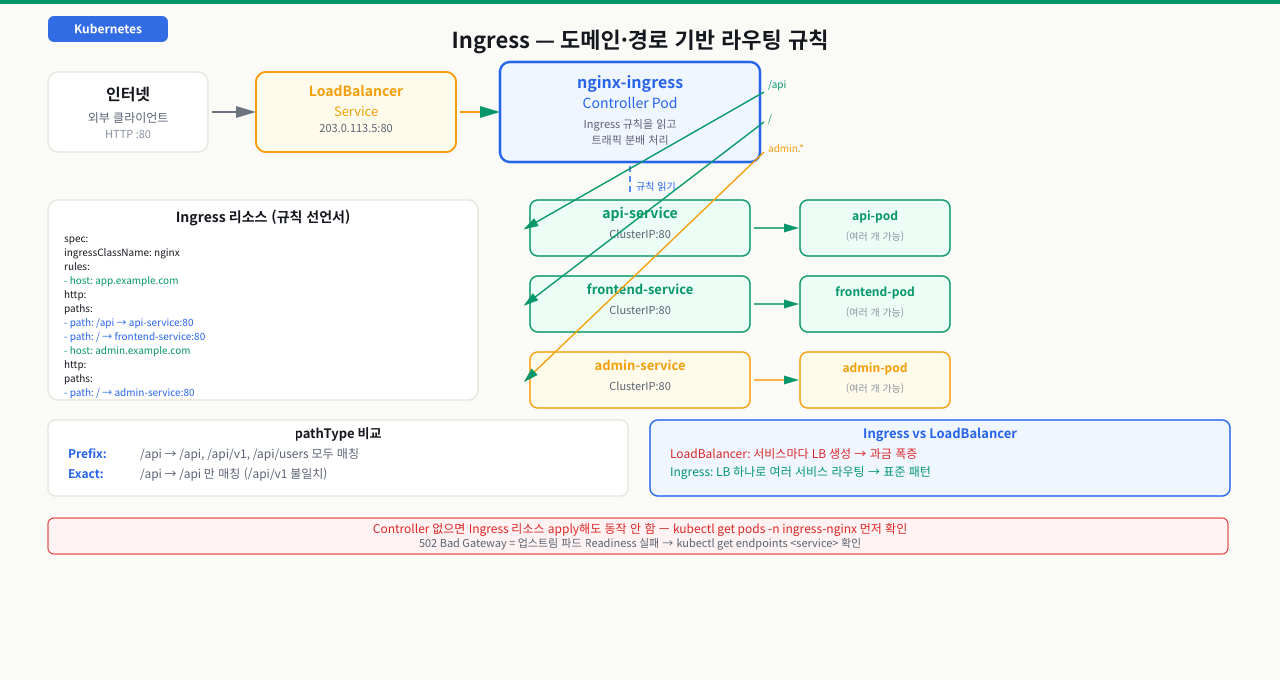
Ingress는 Kubernetes API 오브젝트입니다. "이 호스트, 이 경로로 들어오는 요청은 저 서비스로 보내라"는 라우팅 규칙을 YAML로 선언합니다. 규칙만 정의할 뿐 실제 네트워킹은 처리하지 않습니다.
# Ingress 리소스 — 규칙만 정의
apiVersion: networking.k8s.io/v1
kind: Ingress
metadata:
  name: my-ingress
spec:
  rules:
    - host: app.example.com
      http:
        paths:
          - path: /api
            pathType: Prefix
            backend:
              service:
                name: api-service
                port:
                  number: 80
Ingress Controller — 규칙을 실행하는 파드
Ingress Controller는 위 규칙을 읽고 실제 트래픽을 처리하는 파드입니다. Kubernetes 자체에 내장되어 있지 않아 별도로 설치해야 합니다. 가장 많이 쓰이는 것이 nginx-ingress입니다.
 확대
확대
Controller 설치 확인
# nginx-ingress Controller 파드가 Running이어야 함
kubectl get pods -n ingress-nginx
# NAME                                        READY   STATUS    AGE
# ingress-nginx-controller-7d9c9c4f75-xk2p9   1/1     Running   5m

# Controller의 LoadBalancer Service 확인
kubectl get svc -n ingress-nginx
# NAME                                 TYPE           CLUSTER-IP     EXTERNAL-IP
# ingress-nginx-controller             LoadBalancer   10.96.0.200    203.0.113.5
#                                                                    ↑ 이 IP로 모든 트래픽 유입
- kubectl get ingress에서 ADDRESS 열 먼저 확인 — IP가 있으면 Ingress Controller가 External IP를 할당받은 것, 비어 있으면 LoadBalancer 타입 Service 미생성 또는 클라우드 제공자 미연동
- BACKENDS 열 기준: <service-name>:<port> 형식이 보이면 라우팅 규칙이 등록된 것. "(default backend - 404)" 만 보이면 Ingress 규칙의 host/path가 요청과 불일치
- ADDRESS는 있지만 curl로 접근 시 502이면 → 백엔드 파드의 readinessProbe 실패로 Service Endpoints가 비어있는 것. kubectl get endpoints <service-name>으로 확인
외부 요청이 Pod까지 오는 전체 경로 — Ingress
외부 요청이 Pod까지 오는 전체 경로 — Ingress 6단계
브라우저에 https://app.example.com/api를 입력합니다. 이 요청은 클러스터 바깥에서 출발해, 여러 계층을 지나 특정 파드 안의 프로세스에 닿아야 합니다. 그 사이에서 DNS → 클라우드 LB/NodePort → Ingress Controller → 규칙 매칭 → Service·Endpoints → Pod가 순서대로 일어납니다. 502나 404가 떴을 때 "어느 계층에서 끊겼나"를 이 단계로 좁히지 못하면, Ingress 설정을 고쳐야 할지 백엔드 파드를 고쳐야 할지조차 판단할 수 없습니다.
[브라우저]  https://app.example.com/api
   │
   ① DNS: app.example.com → Ingress Controller의 LB 공인 IP (203.0.113.5)
   │
   ② 클라우드 LoadBalancer(또는 NodePort) → Ingress Controller 파드(nginx)로 유입
   │
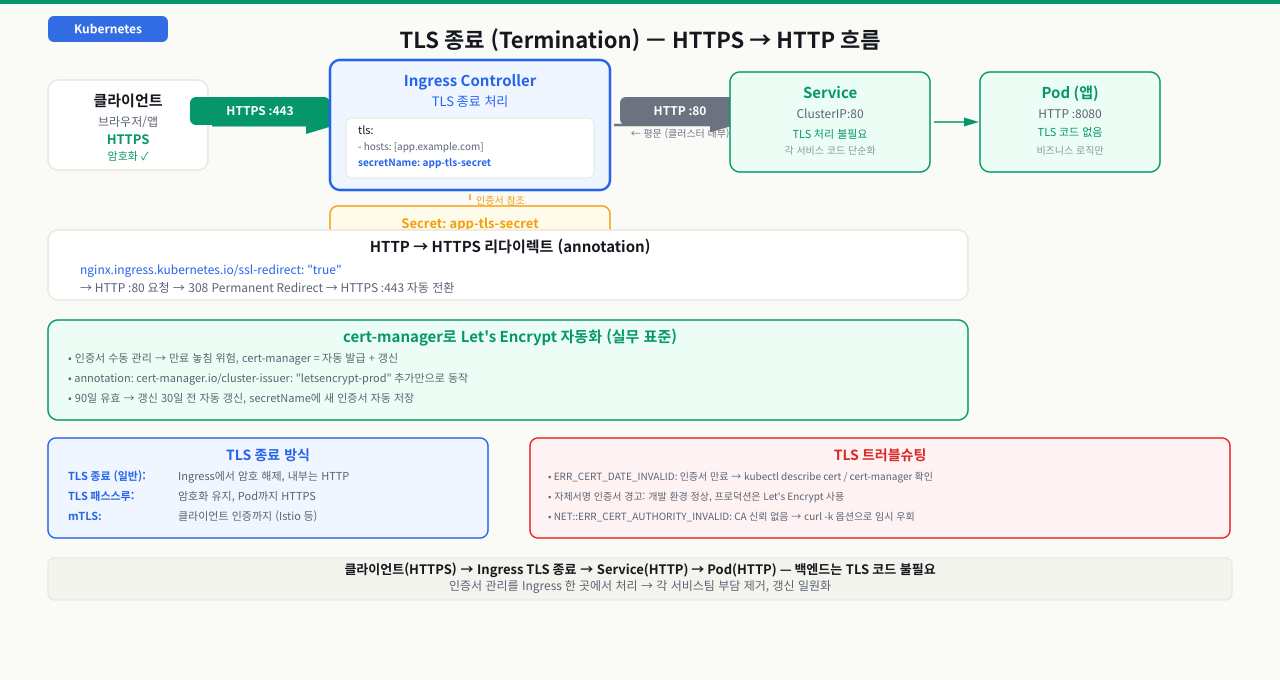
   ③ TLS 종료: nginx가 인증서(Secret)로 HTTPS 복호화 → 이후 클러스터 내부는 평문 HTTP
   │
   ④ Ingress 규칙 매칭: Host(app.example.com) + Path(/api)로 대상 Service 결정
   │
   ⑤ 대상 Service의 Endpoints에서 Ready Pod 하나 선택 (kube-proxy·DNAT)
   │
   ⑥ 선택된 Pod로 프록시 → 응답이 역방향으로 브라우저까지
   ▼
[백엔드 Pod]  api-service → 10.244.0.6:5678 에서 수신·응답
각 단계에서 무슨 일이 일어나고, 막히면 어떤 증상인가:
| 단계 | 하는 일 | 여기서 막히면 |
|---|---|---|
| ① DNS | 도메인을 Ingress Controller의 LB 공인 IP로 해석 | DNS 미설정·/etc/hosts 오설정 → 접속 자체가 안 됨 |
| ② 진입 | 클라우드 LB(또는 NodePort)가 Controller 파드로 트래픽 전달 | kubectl get ingress의 ADDRESS가 비어 있음 → LB 미할당·클라우드 미연동 |
| ③ TLS 종료 | Controller가 tls.secretName 인증서로 복호화, 내부 구간은 HTTP | 인증서 만료·SNI 불일치 → TLS handshake 실패, 브라우저 인증서 경고 |
| ④ 규칙 매칭 | Host·Path 규칙(Prefix/Exact)으로 백엔드 Service 결정 | 규칙과 요청이 불일치 → default backend가 응답하는 404 |
| ⑤ Endpoints | 대상 Service의 Ready Pod 목록에서 선택 | Endpoints가 비면(readiness 실패) → 502 Bad Gateway |
| ⑥ 프록시·응답 | Pod로 요청 전달하고 응답 반환 | Pod 처리 지연 → 504, 요청 바디 초과 → 413 |
502와 404는 서로 다른 계층을 가리킵니다 — 404는 ④에서 Host·Path가 어떤 규칙과도 매칭되지 않은 것(Ingress 설정 문제 — 오타·pathType·host 누락)이고, 502는 ⑤에서 대상 Service의 Endpoints가 비어 받아 줄 파드가 없는 것(백엔드 파드 문제 — readiness 실패)입니다. 이 둘을 구분하면 고쳐야 할 대상이 갈립니다 — 404는 Ingress 규칙을, 502는 파드와 Endpoints를 봅니다.
즉 외부 요청이 파드에 닿으려면 진입(②)·매칭(④)·백엔드(⑤) 세 관문이 모두 통과돼야 합니다. 진단도 이 순서 그대로 — 먼저 kubectl get ingress로 ADDRESS를 확인(②), 다음 kubectl describe ingress로 규칙이 요청과 맞는지(④), 마지막으로 kubectl get endpoints <service>로 백엔드에 Ready 파드가 있는지(⑤)를 봅니다. 어느 관문에서 멈췄는지가 곧 원인의 계층입니다.
경로 기반 라우팅 (Path-Based Routing)
마이크로서비스 초기에는 서비스마다 별도 도메인을 쓰다가 인증서 관리와 CORS 설정이 폭발적으로 늘어납니다. 팀이 프론트엔드, API, 어드민을 각각 다른 도메인으로 서비스하면 클라이언트 코드에 하드코딩된 도메인이 수십 곳으로 퍼집니다. 단일 도메인에서 경로로 서비스를 구분하면 인증서는 하나, 도메인은 하나로 줄고 내부 라우팅 변경이 클라이언트에 영향을 주지 않습니다. 이 CB에서는 같은 도메인 아래 /api, /admin, / 경로를 다른 서비스로 분배하는 경로 기반 라우팅 설정을 다룹니다.
실습: 두 서비스 배포 후 경로 라우팅
# backend-services.yaml
---
# API 서비스
apiVersion: apps/v1
kind: Deployment
metadata:
  name: api-app
  namespace: ingress-lab
spec:
  replicas: 2
  selector:
    matchLabels:
      app: api
  template:
    metadata:
      labels:
        app: api
    spec:
      containers:
        - name: api
          image: hashicorp/http-echo:latest
          args: ["-text=Hello from API service"]
          ports:
            - containerPort: 5678
---
apiVersion: v1
kind: Service
metadata:
  name: api-service
  namespace: ingress-lab
spec:
  selector:
    app: api
  ports:
    - port: 80
      targetPort: 5678
---
# 프론트엔드 서비스
apiVersion: apps/v1
kind: Deployment
metadata:
  name: frontend-app
  namespace: ingress-lab
spec:
  replicas: 2
  selector:
    matchLabels:
      app: frontend
  template:
    metadata:
      labels:
        app: frontend
    spec:
      containers:
        - name: frontend
          image: hashicorp/http-echo:latest
          args: ["-text=Hello from Frontend service"]
          ports:
            - containerPort: 5678
---
apiVersion: v1
kind: Service
metadata:
  name: frontend-service
  namespace: ingress-lab
spec:
  selector:
    app: frontend
  ports:
    - port: 80
      targetPort: 5678
kubectl apply -f backend-services.yaml

# 파드 Running 확인 후 Ingress 적용
kubectl get pods -n ingress-lab
경로 기반 Ingress 설정
# path-ingress.yaml
apiVersion: networking.k8s.io/v1
kind: Ingress
metadata:
  name: path-ingress
  namespace: ingress-lab
  annotations:
    nginx.ingress.kubernetes.io/rewrite-target: /   # 경로 재작성
spec:
  ingressClassName: nginx                           # Controller 지정
  rules:
    - host: app.example.com
      http:
        paths:
          - path: /api                              # /api/* → api-service
            pathType: Prefix
            backend:
              service:
                name: api-service
                port:
                  number: 80
          - path: /                                 # /* → frontend-service
            pathType: Prefix
            backend:
              service:
                name: frontend-service
                port:
                  number: 80
kubectl apply -f path-ingress.yaml

# Ingress 확인
kubectl get ingress -n ingress-lab
# NAME            CLASS   HOSTS             ADDRESS         PORTS   AGE
# path-ingress    nginx   app.example.com   203.0.113.5     80      1m

# /etc/hosts에 테스트용 항목 추가 (로컬 테스트)
echo "203.0.113.5 app.example.com" | sudo tee -a /etc/hosts

# 경로별 라우팅 테스트
curl http://app.example.com/api
# Hello from API service

curl http://app.example.com/
# Hello from Frontend service
pathType 차이
| pathType | 설명 | 예시 |
|---|---|---|
Prefix | 경로 접두사 매칭 | /api는 /api, /api/v1, /api/users 모두 매칭 |
Exact | 정확한 경로만 매칭 | /api는 /api만 매칭, /api/v1은 불일치 |
ImplementationSpecific | Controller 구현에 따라 다름 | nginx의 경우 정규식 지원 |
호스트 기반 라우팅과 TLS 종단
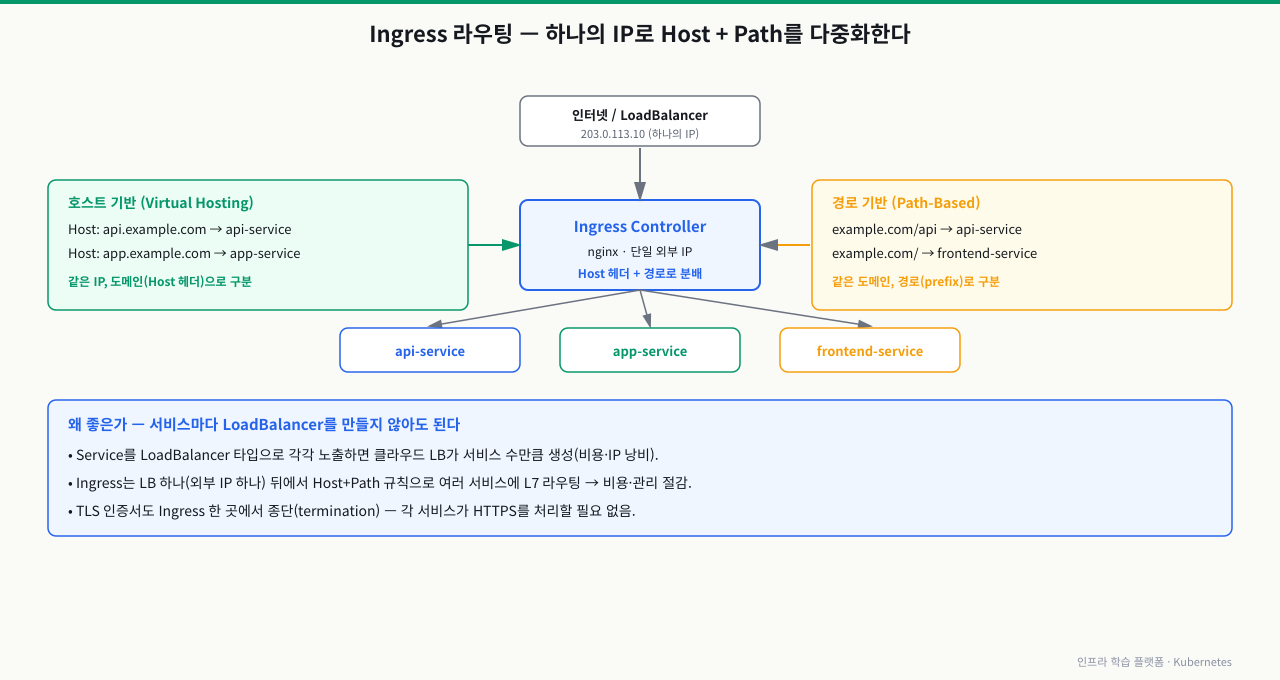
api.example.com과 app.example.com이 서로 다른 팀이 운영하는 서비스인데 각 팀이 HTTPS 인증서를 따로 관리하면 만료 사고가 발생합니다. 서브도메인마다 LoadBalancer를 두면 클라우드 비용이 서비스 수만큼 증가합니다. 호스트 기반 라우팅은 하나의 Ingress Controller에서 Host 헤더를 기준으로 서로 다른 서비스로 트래픽을 분기하고, TLS 종단을 Controller 한 곳에서 처리해 백엔드 파드가 인증서를 신경 쓰지 않아도 됩니다. 이 CB에서는 서브도메인별 라우팅 설정과 TLS Secret 연결 방법을 다룹니다.
호스트 기반 라우팅 (Virtual Hosting)
 확대
확대
서로 다른 서브도메인을 다른 서비스로 라우팅합니다.
# host-ingress.yaml
apiVersion: networking.k8s.io/v1
kind: Ingress
metadata:
  name: host-ingress
  namespace: ingress-lab
spec:
  ingressClassName: nginx
  rules:
    - host: api.example.com          # api 서브도메인
      http:
        paths:
          - path: /
            pathType: Prefix
            backend:
              service:
                name: api-service
                port:
                  number: 80
    - host: app.example.com          # app 서브도메인
      http:
        paths:
          - path: /
            pathType: Prefix
            backend:
              service:
                name: frontend-service
                port:
                  number: 80
TLS 종단 설정
TLS 인증서를 Secret으로 저장하고 Ingress에 연결합니다.
 확대
확대
1단계: TLS Secret 생성
# 자체 서명 인증서 생성 (테스트용)
openssl req -x509 -nodes -days 365 -newkey rsa:2048 \
  -keyout tls.key \
  -out tls.crt \
  -subj "/CN=app.example.com/O=example"

# Kubernetes Secret으로 저장
kubectl create secret tls app-tls-secret \
  --key tls.key \
  --cert tls.crt \
  -n ingress-lab

# Secret 확인
kubectl get secret app-tls-secret -n ingress-lab
# NAME              TYPE                DATA   AGE
# app-tls-secret    kubernetes.io/tls   2      10s
2단계: TLS가 적용된 Ingress
# tls-ingress.yaml
apiVersion: networking.k8s.io/v1
kind: Ingress
metadata:
  name: tls-ingress
  namespace: ingress-lab
  annotations:
    nginx.ingress.kubernetes.io/ssl-redirect: "true"   # HTTP → HTTPS 리다이렉트
spec:
  ingressClassName: nginx
  tls:
    - hosts:
        - app.example.com
      secretName: app-tls-secret      # TLS 인증서 Secret 참조
  rules:
    - host: app.example.com
      http:
        paths:
          - path: /api
            pathType: Prefix
            backend:
              service:
                name: api-service
                port:
                  number: 80
          - path: /
            pathType: Prefix
            backend:
              service:
                name: frontend-service
                port:
                  number: 80
kubectl apply -f tls-ingress.yaml

# HTTPS 테스트 (자체 서명 인증서인 격리된 실습 환경에서만 -k 사용)
curl -k https://app.example.com/api
# Hello from API service

# 운영·공유 환경에서는 검증한 CA를 사용하고 -k를 쓰지 않습니다.
# curl --cacert /path/to/verified-ca.crt https://app.example.com/api

# HTTP → HTTPS 리다이렉트 확인
curl -v http://app.example.com/
# < HTTP/1.1 308 Permanent Redirect
# < Location: https://app.example.com/
cert-manager로 Let's Encrypt 인증서 자동화 (실무 패턴)
프로덕션에서는 cert-manager를 사용하여 Let's Encrypt 인증서를 자동 발급·갱신합니다.
# cert-manager 사용 시 Ingress annotation만 추가하면 자동 발급
metadata:
  annotations:
    cert-manager.io/cluster-issuer: "letsencrypt-prod"
spec:
  tls:
    - hosts:
        - app.example.com
      secretName: app-tls-cert        # cert-manager가 자동으로 생성
문제 상황
curl https://app.example.com/api
# <html>
# <head><title>502 Bad Gateway</title></head>
# <body><h1>502 Bad Gateway</h1></body>
# </html>
Ingress는 정상 설정했고 Service도 존재하는데 502가 반환됩니다.
진단 1: Ingress Controller 로그 확인
# nginx-ingress Controller 파드 이름 확인
kubectl get pods -n ingress-nginx

# Controller 로그에서 upstream 오류 확인
kubectl logs -n ingress-nginx ingress-nginx-controller-xxxx | grep -i "upstream\|502\|error" | tail -20
# [error] 123#123: *456 connect() failed (111: Connection refused)
# while connecting to upstream, ... upstream: "http://10.244.0.5:5678"
진단 2: Endpoints 확인
# 업스트림 Service의 Endpoints 확인
kubectl get endpoints api-service -n ingress-lab
# NAME          ENDPOINTS   AGE
# api-service   <none>      5m   ← Endpoints 없음!
진단 3: 파드 Readiness Probe 상태 확인
kubectl get pods -n ingress-lab
# NAME                    READY   STATUS    RESTARTS
# api-app-7d9f4c-xk2p9    0/1     Running   0   ← READY가 0/1

# 파드 상세 확인
kubectl describe pod api-app-7d9f4c-xk2p9 -n ingress-lab
# Conditions:
#   Type              Status
#   Ready             False        ← Readiness 실패
# Events:
#   Warning  Unhealthy   Readiness probe failed: Get "http://10.244.0.5:5678/health": dial tcp: connect: connection refused
원인 분석
파드가 Running이어도 Readiness Probe가 실패하면 Service Endpoints에서 제외됩니다. Ingress Controller는 Endpoints가 없는 Service에 연결을 시도하지만 받아줄 파드가 없어 502를 반환합니다.
상태 흐름:
파드 Running + Readiness 실패
    → Endpoints에서 제외
    → Service로 트래픽 전달 불가
    → Ingress Controller: 502 Bad Gateway
해결 방법
방법 1: Readiness Probe 경로/포트 확인
# 실제 파드가 리스닝하는 포트 확인
kubectl exec -it api-app-7d9f4c-xk2p9 -n ingress-lab -- ss -tlnp
# State    Recv-Q   Send-Q   Local Address:Port
# LISTEN   0        128      0.0.0.0:5678     ← 5678 포트에서 리스닝

# Readiness Probe 설정 수정 (올바른 경로와 포트로)
# Deployment에 올바른 Readiness Probe 설정
spec:
  containers:
    - name: api
      readinessProbe:
        httpGet:
          path: /           # 실제 응답하는 경로
          port: 5678        # 컨테이너가 리스닝하는 포트
        initialDelaySeconds: 5
        periodSeconds: 10
방법 2: 애플리케이션이 시작 전 probe 실패 — 지연 추가
readinessProbe:
  httpGet:
    path: /health
    port: 8080
  initialDelaySeconds: 15    # 앱 시작까지 기다리는 시간 증가
  periodSeconds: 5
  failureThreshold: 3
방법 3: Readiness Probe 없이 즉시 확인 (임시)
# Probe 없이 파드 재배포 후 연결 확인
kubectl rollout restart deployment/api-app -n ingress-lab
kubectl get endpoints api-service -n ingress-lab -w
# NAME          ENDPOINTS           AGE
# api-service   10.244.0.7:5678     1m   ← Endpoints 등록됨!
예방 체크리스트
# 배포 후 필수 확인 순서
# 1. 파드 READY 상태 확인
kubectl get pods -n ingress-lab

# 2. Endpoints 비어있지 않은지 확인
kubectl get endpoints -n ingress-lab

# 3. Ingress 주소 할당 확인
kubectl get ingress -n ingress-lab

# 4. Ingress Controller 로그 확인
kubectl logs -n ingress-nginx -l app.kubernetes.io/name=ingress-nginx --tail=20
심화 — Controller가 규칙과 파드를 실시간으로 좇는 법
심화: Ingress Controller는 어떻게 트래픽을 넘기나 — watch·reload·동적 엔드포인트
Ingress 리소스는 규칙 선언일 뿐이고 실제 라우팅은 Controller가 한다는 건 배웠습니다. 하지만 그 Controller가 규칙과 파드 변화를 어떻게 실시간으로 반영하는지 모르면, 배포 중 튀는 502나 타임아웃의 진짜 원인을 짚지 못합니다.
- watch → 설정 생성: ingress-nginx는 API 서버의 Ingress·Service·Endpoints(EndpointSlice)를 watch하다가 변화가 생기면 nginx 설정을 다시 만듭니다. host·path 규칙과 annotation은 각각 대응하는 nginx 지시어로 번역됩니다.
- reload vs 동적 업데이트: 초기엔 변경마다 nginx를 reload했는데, 파드가 자주 바뀌는 환경에선 reload가 잦아 커넥션이 끊길 수 있습니다. 그래서 최신 ingress-nginx는 업스트림 엔드포인트 목록 변화는 Lua로 reload 없이 동적으로 갱신하고, 설정 구조 자체가 바뀔 때만 reload합니다.
- 그래도 남는 전파 지연: 파드가 종료되어 Endpoints에서 빠지는 사건이 API→컨트롤러→업스트림 목록으로 퍼지는 데엔 짧은 지연이 있습니다. 이 지연 창에 들어온 요청은 이미 죽어 가는 파드로 갈 수 있습니다.
- annotation = nginx 지시어:
proxy-read-timeout,proxy-body-size,rewrite-target같은 annotation은 각각 nginx 지시어 하나로 매핑됩니다. 타임아웃(기본 60초)·요청 바디 크기(기본 1MB) 같은 기본값을 모르면 504·413을 엉뚱한 데서 찾게 됩니다.
정리하면 Controller는 "규칙과 파드의 현재 상태를 끊임없이 좇아 nginx 설정으로 번역하는 번역기"입니다. 그 번역이 언제·어떻게 반영되는지가 배포 중 안정성을 좌우합니다.
상황: 롤링 업데이트를 돌릴 때마다 그 수 초 동안 클라이언트에 502·연결 리셋이 산발적으로 뜨고, 새 파드가 다 뜨고 나면 사라집니다. 파드 readiness는 정상이고 평상시엔 전혀 문제가 없습니다.
원인: 파드가 종료될 때 두 가지가 동시에 벌어집니다 — kubelet이 컨테이너에 SIGTERM을 보내는 것과, 그 파드가 Endpoints에서 빠졌다는 사실이 Ingress Controller의 업스트림 목록까지 전파되는 것. 이 둘엔 짧은 시차가 있어서, 앱이 SIGTERM에 곧바로 리스너를 닫아 버리면 아직 자기를 업스트림으로 알고 요청을 보내는 컨트롤러의 커넥션이 거부돼 502·리셋이 됩니다. 즉 readiness 실패가 아니라 '종료 순간의 전파 경쟁'이 원인입니다.
진단: 502가 특정 파드의 종료 시각과 겹치는지 확인합니다 — 컨트롤러 로그의 업스트림 연결 에러와 kubectl get events의 파드 Killing 이벤트 타임스탬프를 맞춰 봅니다. 평상시엔 0건이고 오직 롤아웃 순간에만 튄다면 전파 경쟁이 유력합니다.
해결: 파드에 preStop 훅으로 짧게(예: 5~10초) 대기시켜, Endpoints 제거가 컨트롤러까지 전파될 시간을 벌고 그동안 진행 중 요청을 마저 처리한 뒤 종료하게 합니다. 앱은 SIGTERM에서 즉시 죽지 말고 graceful shutdown으로 새 연결만 거절하며 진행 중 요청을 비웁니다. terminationGracePeriodSeconds를 넉넉히 주고, 필요하면 컨트롤러가 죽은 업스트림에 대해 다음 파드로 재시도하도록(proxy-next-upstream) 둡니다.
실무에서 Ingress를 구성하는 방식
팀별 Ingress 분리 vs 중앙 관리
# 패턴 1: 팀마다 자체 Ingress (namespace 분리)
# team-a 네임스페이스에 team-a 서비스용 Ingress
# team-b 네임스페이스에 team-b 서비스용 Ingress

# 패턴 2: 중앙 Ingress (단일 진입점)
# 모든 라우팅을 infra 팀이 관리하는 Ingress 하나로 통합
대부분의 팀은 패턴 1을 선호합니다. 네임스페이스 격리로 팀 간 영향이 줄고, 각 팀이 자체 배포 파이프라인으로 Ingress를 관리할 수 있습니다.
Canary 배포와 Ingress
# nginx-ingress의 canary annotation으로 트래픽 분할
apiVersion: networking.k8s.io/v1
kind: Ingress
metadata:
  name: my-app-canary
  annotations:
    nginx.ingress.kubernetes.io/canary: "true"
    nginx.ingress.kubernetes.io/canary-weight: "20"  # 20% 트래픽을 새 버전으로
spec:
  rules:
    - host: app.example.com
      http:
        paths:
          - path: /
            pathType: Prefix
            backend:
              service:
                name: my-app-v2   # 새 버전 서비스
                port:
                  number: 80
Rate Limiting으로 DDoS 방어
metadata:
  annotations:
    nginx.ingress.kubernetes.io/limit-connections: "5"
    nginx.ingress.kubernetes.io/limit-rpm: "60"       # 분당 60회 제한
    nginx.ingress.kubernetes.io/limit-rps: "10"       # 초당 10회 제한
실무 체크리스트
운영 환경에서 Ingress를 배포하기 전 반드시 확인해야 하는 항목들입니다.
- Readiness Probe가 모든 파드에 설정되어 있는가?
- TLS 인증서 만료일을 모니터링하고 있는가? (cert-manager 사용 권장)
- Ingress Controller의 리소스 제한(requests/limits)이 설정되어 있는가?
- 트래픽 급증 시 Controller HPA(Horizontal Pod Autoscaler)가 설정되어 있는가?
정리
# 주요 진단 명령어

# Ingress 목록 확인
kubectl get ingress -n <namespace>

# Ingress 상세 정보 (규칙, 백엔드, TLS 확인)
kubectl describe ingress <ingress-name> -n <namespace>

# Ingress Controller 로그 실시간 확인
kubectl logs -n ingress-nginx -l app.kubernetes.io/name=ingress-nginx -f

# 업스트림 Service Endpoints 확인
kubectl get endpoints -n <namespace>

# TLS Secret 확인
kubectl get secret -n <namespace>
kubectl describe secret <tls-secret-name> -n <namespace>

# Ingress Controller가 읽은 nginx 설정 확인
kubectl exec -n ingress-nginx deploy/ingress-nginx-controller -- \
  cat /etc/nginx/nginx.conf | grep -A10 "upstream"
nginx-ingress Controller 설치 확인
kubectl get pods -n ingress-nginx
kubectl get ingressclass예상 출력
NAME                                      READY   STATUS    AGE
ingress-nginx-controller-xxx              1/1     Running   2m
NAME    CONTROLLER             PARAMETERS   AGE
nginx   k8s.io/ingress-nginx   <none>       2m
백엔드 서비스 2개 배포
kubectl apply -f - <<'EOF'
apiVersion: apps/v1
kind: Deployment
metadata:
name: app-v1
spec:
replicas: 1
selector:
  matchLabels:
    app: app-v1
template:
  metadata:
    labels:
      app: app-v1
  spec:
    containers:
    - name: app
      image: hashicorp/http-echo
      args: ["-text=Hello from v1"]
      ports:
      - containerPort: 5678
---
apiVersion: v1
kind: Service
metadata:
name: app-v1-svc
spec:
selector:
  app: app-v1
ports:
- port: 80
  targetPort: 5678
EOF
kubectl get svc app-v1-svc예상 출력
NAME          TYPE        CLUSTER-IP     PORT(S)
app-v1-svc   ClusterIP   10.96.x.x      80/TCP
경로 기반 라우팅 Ingress 생성
kubectl apply -f - <<'EOF'
apiVersion: networking.k8s.io/v1
kind: Ingress
metadata:
name: demo-ingress
annotations:
  nginx.ingress.kubernetes.io/rewrite-target: /
spec:
ingressClassName: nginx
rules:
- host: demo.local
  http:
    paths:
    - path: /v1
      pathType: Prefix
      backend:
        service:
          name: app-v1-svc
          port:
            number: 80
EOF
kubectl describe ingress demo-ingress예상 출력
Name:             demo-ingress
Rules:
  Host        Path  Backends
  ----        ----  --------
  demo.local
/v1 app-v1-svc:80Ingress를 통한 라우팅 확인
kubectl get ingress demo-ingress
kubectl get endpoints app-v1-svc예상 출력
NAME           CLASS   HOSTS        ADDRESS     PORTS
demo-ingress   nginx   demo.local   127.0.0.1   80
NAME          ENDPOINTS
app-v1-svc    10.244.x.x:5678
실습 리소스 정리
kubectl delete ingress demo-ingress
kubectl delete deployment app-v1
kubectl delete svc app-v1-svc예상 출력
ingress.networking.k8s.io "demo-ingress" deleted
deployment.apps "app-v1" deleted
service "app-v1-svc" deleted
명령어·단축키 빠른 참조
이 모듈에서 다룬 Ingress 라우팅·TLS·502 진단 명령을 실전 옵션과 함께 모았습니다.
| 명령어/단축키 | 용도 | 자주 쓰는 예 |
|---|---|---|
kubectl get ingress | ADDRESS·HOSTS·CLASS 확인 | kubectl get ingress -n ingress-lab (ADDRESS 비면 LB 미할당) |
kubectl describe ingress | 규칙·백엔드·TLS 매핑 확인 | kubectl describe ingress my-ingress (Backends에 svc:port) |
kubectl get endpoints | 백엔드 Service 실엔드포인트 | kubectl get endpoints api-service (비어 있으면 502 원인) |
kubectl logs (controller) | nginx upstream 오류 추적 | kubectl logs -n ingress-nginx -l app.kubernetes.io/name=ingress-nginx -f |
kubectl get pods -n ingress-nginx | 컨트롤러 파드 Running 확인 | kubectl get pods -n ingress-nginx |
kubectl get ingressclass | 사용 가능한 클래스 확인 | kubectl get ingressclass (spec.ingressClassName에 지정) |
kubectl create secret tls | TLS 인증서 Secret 생성 | kubectl create secret tls app-tls --key tls.key --cert tls.crt |
kubectl exec -- ss -tlnp | 파드 리슨 포트 확인(probe 진단) | kubectl exec -it api-app-xxx -- ss -tlnp |
kubectl rollout restart | 백엔드 재배포로 endpoints 재등록 | kubectl rollout restart deploy/api-app -n ingress-lab |
curl -k / -v | 격리된 자체서명 테스트·리다이렉트 확인 | 테스트 전용 curl -k; 운영은 curl --cacert <verified-ca> |
관련 모듈로 더 깊이:
- ClusterIP, NodePort, LoadBalancer 서비스 완전 분석 — Ingress가 트래픽을 넘겨주는 백엔드 Service의 ClusterIP/NodePort/LoadBalancer 차이
- NetworkPolicy를 활용한 특정 파드 간 통신 차단 및 제한 — Ingress로 들어온 트래픽을 파드 레벨에서 다시 제한하는 L3/L4 통신 제어
- Istio 서비스 메시가 제공하는 가시성과 mTLS 보안 — Ingress Controller로는 부족한 L7 라우팅·카나리·mTLS를 서비스 메시로 확장하는 법
다음 챕터에서는 ConfigMap과 Secret으로 애플리케이션 설정을 파드에 주입하는 방법을 학습합니다.