배포 직후 파드는 Running인데 실제 요청은 503으로 실패합니다. 앱이 준비되기 전에 Service가 트래픽을 보내거나, 죽은 프로세스를 kubelet이 감지하지 못하면 장애가 길어집니다. Liveness, Readiness, Startup Probe는 Kubernetes가 애플리케이션 상태를 올바르게 판단하게 해줍니다.
신규 버전을 배포했습니다. kubectl rollout status가 완료됐고 파드는 Running입니다. 그런데 배포 직후 5분 동안 고객들이 503 에러를 받았습니다. 무슨 일이 벌어진 걸까요? 앱이 시작되는 데 30초가 필요한데, Kubernetes는 컨테이너가 Running 상태가 되는 즉시 트래픽을 보냈습니다. 아직 준비가 안 된 파드가 요청을 받아 에러를 반환한 겁니다.
이 문제의 해답이 Probe입니다. Kubernetes는 세 가지 Probe로 컨테이너의 상태를 주기적으로 확인합니다. Liveness Probe는 "이 컨테이너가 살아있는가? 아니면 재시작해야 하는가"를 판단하고, Readiness Probe는 "이 컨테이너가 트래픽을 받을 준비가 됐는가"를 판단합니다. Startup Probe는 초기화가 오래 걸리는 앱을 위한 특별한 유예 기간입니다. 세 Probe를 올바르게 설정하면 배포 중에도 무중단 서비스가 가능합니다.
- 1Liveness Probe로 앱 장애를 자동 감지하고 재시작할 수 있다
- 2Readiness Probe로 준비 전 트래픽을 차단할 수 있다
- 3Startup Probe로 느린 초기화에 대응할 수 있다
- 4HTTP, TCP, Exec 세 가지 Probe 유형을 구분해 사용할 수 있다
- 5Probe 파라미터(initialDelaySeconds, periodSeconds 등)를 튜닝할 수 있다
- 6배포 중 무중단을 위한 Probe 설계 패턴을 적용할 수 있다
kubectl create namespace probe-demokubectl run probe-test --image=nginx:1.25 -n probe-demo --dry-run=clientkubectl get endpoints -n probe-demo 2>/dev/null || echo 'ready'kubectl get events --sort-by=.lastTimestamp -n probe-demo 2>/dev/null | head -5 || echo 'ready'Liveness Probe: 데드락과 무한루프를 감지해 재시작
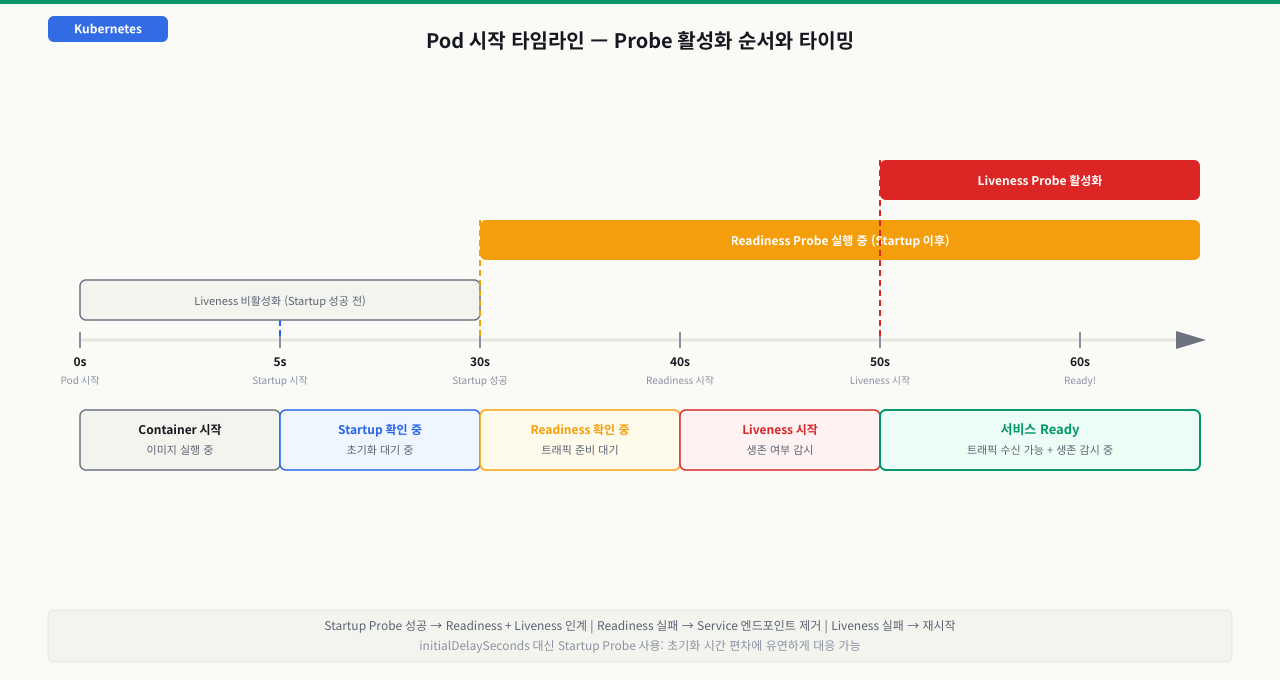
앱이 Running 상태지만 실제로는 응답을 못하는 상황이 있습니다. 데드락, 메모리 누수로 인한 GC 멈춤, 무한 루프 등이 대표적입니다. Liveness Probe는 이를 감지해 컨테이너를 재시작합니다.
 확대
확대
# liveness-demo.yaml
apiVersion: v1
kind: Pod
metadata:
  name: liveness-http
  namespace: probe-demo
spec:
  containers:
  - name: app
    image: registry.k8s.io/e2e-test-images/agnhost:2.40
    args:
    - liveness
    livenessProbe:
      httpGet:
        path: /healthz     # 이 엔드포인트가 200-399 반환하면 정상
        port: 8080
        httpHeaders:       # 필요 시 헤더 추가
        - name: Custom-Header
          value: Awesome
      initialDelaySeconds: 5   # 컨테이너 시작 후 5초 대기 후 첫 체크
      periodSeconds: 10         # 10초마다 체크
      timeoutSeconds: 3         # 3초 내 응답 없으면 실패
      failureThreshold: 3       # 3번 연속 실패 시 재시작
      successThreshold: 1       # 1번 성공하면 정상으로 간주
TCP 소켓 방식 (DB처럼 HTTP 엔드포인트가 없는 경우):
livenessProbe:
  tcpSocket:
    port: 3306
  initialDelaySeconds: 15
  periodSeconds: 20
Exec 방식 (커스텀 스크립트 실행):
livenessProbe:
  exec:
    command:
    - cat
    - /tmp/healthy
  initialDelaySeconds: 5
  periodSeconds: 5
# 배포 후 Probe 상태 확인
kubectl apply -f liveness-demo.yaml
kubectl describe pod liveness-http -n probe-demo | grep -A 10 "Liveness"
# Liveness:  http-get http://:8080/healthz delay=5s timeout=3s period=10s #success=1 #failure=3

# Probe 실패 이벤트 확인
kubectl get events -n probe-demo --sort-by=.lastTimestamp | grep -i "liveness\|unhealthy"
# Warning  Unhealthy  5s    pod/liveness-http  Liveness probe failed: HTTP probe failed with statuscode: 500
# Normal   Killing    5s    pod/liveness-http  Container app failed liveness probe, will be restarted
- kubectl get events -n <ns> | grep -i "unhealthy"에서 "Liveness probe failed" 메시지를 먼저 확인 — 연속으로 나오고 있으면 failureThreshold 초과 전 상태이거나 이미 컨테이너 재시작이 트리거됨
- RESTARTS 수치 기준: liveness probe만 있을 때 재시작 횟수가 계속 오르면 probe 판단 기준이 너무 엄격한 것. initialDelaySeconds를 앱 시작 시간보다 최소 10초 이상 여유있게 설정해야 오탐 방지
- STATUS=Running이고 READY=0/1이면 → readiness probe만 실패 중. 트래픽이 차단된 상태로, 컨테이너는 살아있음. kubectl describe pod <name>의 Readiness probe: 항목에서 실제 실행 중인 엔드포인트/명령어 확인
Readiness Probe: 준비된 파드만 트래픽 받기
롤링 업데이트 중 새 파드가 Running 상태가 되는 순간, 아직 DB 연결도 못 맺고 캐시도 워밍업 안 된 상태에서 실제 요청이 들어오면 503이 발생합니다. Liveness Probe가 실패했다고 해서 바로 재시작하면 서비스가 더 불안정해질 수 있습니다. Readiness Probe는 이 두 가지를 명확히 분리합니다. 파드가 살아있더라도 아직 준비가 안 됐으면 Service 엔드포인트에서 제외해 트래픽을 차단하고, 준비가 완료되면 자동으로 복귀시킵니다.
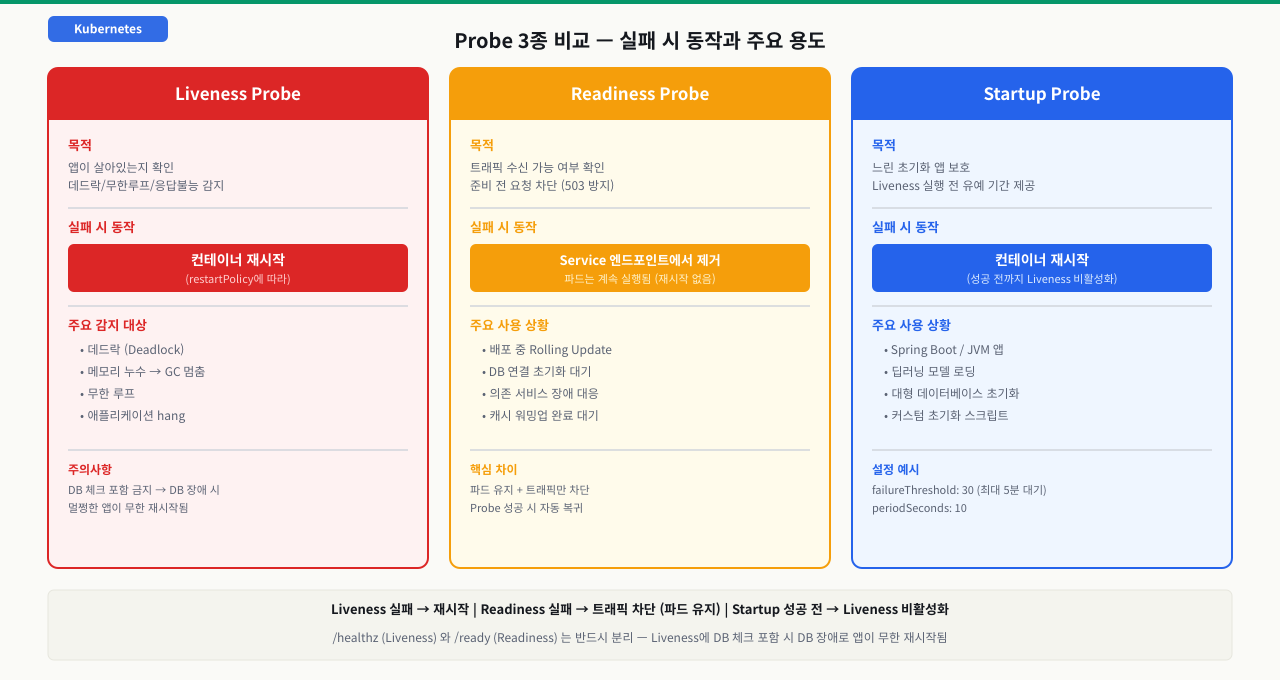
Readiness Probe는 Service가 트래픽을 보낼 파드를 결정합니다. 실패하면 파드가 Service 엔드포인트에서 제거되어 트래픽이 차단되고, 다시 성공하면 복귀합니다. 파드는 종료되지 않습니다.
 확대
확대
이 동작이 Liveness Probe와의 핵심 차이입니다:
- Liveness 실패 → 컨테이너 재시작
- Readiness 실패 → 트래픽 차단 (파드는 유지)
# readiness-deployment.yaml
apiVersion: apps/v1
kind: Deployment
metadata:
  name: web-app
  namespace: probe-demo
spec:
  replicas: 3
  selector:
    matchLabels:
      app: web-app
  template:
    metadata:
      labels:
        app: web-app
    spec:
      containers:
      - name: web
        image: nginx:1.25
        ports:
        - containerPort: 80
        readinessProbe:
          httpGet:
            path: /ready      # /ready가 200 반환할 때만 트래픽 수신
            port: 80
          initialDelaySeconds: 10   # 앱 초기화 대기
          periodSeconds: 5
          failureThreshold: 3
          successThreshold: 1
        livenessProbe:
          httpGet:
            path: /healthz
            port: 80
          initialDelaySeconds: 30
          periodSeconds: 10
          failureThreshold: 3
kubectl apply -f readiness-deployment.yaml

# 엔드포인트 확인 (Readiness 통과한 파드만 목록에 있음)
kubectl get endpoints web-app-svc -n probe-demo
# NAME         ENDPOINTS                                         AGE
# web-app-svc  10.244.1.5:80,10.244.1.6:80,10.244.2.3:80       30s

# 특정 파드의 Readiness 상태
kubectl get pod -n probe-demo -o wide
# READY 컬럼: 3/3이면 모든 컨테이너가 Readiness 통과
# READY 컬럼: 0/1이면 Readiness 실패 중
Startup Probe: 느린 앱을 위한 유예 기간
Spring Boot, JVM 기반 서비스, 대규모 딥러닝 모델 로딩처럼 초기화에 수십 초가 필요한 앱에서 Liveness Probe의 initialDelaySeconds만으로는 대응이 어렵습니다. 시작 시간에 편차가 있기 때문입니다.
Startup Probe가 성공하기 전까지 Liveness Probe는 실행되지 않습니다. 즉, "초기화 완료 신호"를 보내기 전까지 Liveness가 파드를 재시작하지 않도록 보호합니다.
containers:
- name: spring-app
  image: myapp/spring-api:v2.0
  ports:
  - containerPort: 8080
  startupProbe:
    httpGet:
      path: /actuator/health/liveness
      port: 8080
    failureThreshold: 30    # 최대 30번 × 10초 = 300초(5분) 대기
    periodSeconds: 10
  livenessProbe:
    httpGet:
      path: /actuator/health/liveness
      port: 8080
    initialDelaySeconds: 0  # Startup이 성공하면 즉시 시작
    periodSeconds: 10
    failureThreshold: 3
  readinessProbe:
    httpGet:
      path: /actuator/health/readiness
      port: 8080
    initialDelaySeconds: 0
    periodSeconds: 5
    failureThreshold: 3
Spring Boot Actuator의 /actuator/health/liveness와 /actuator/health/readiness는 K8s Probe에 최적화된 전용 엔드포인트입니다. 각각 livenessState와 readinessState를 독립적으로 노출합니다.
# Startup Probe 동작 확인
kubectl describe pod spring-app-xxx -n probe-demo | grep -A 5 "Startup"
# Startup:  http-get http://:8080/actuator/health/liveness
#           delay=0s timeout=1s period=10s #success=1 #failure=30

# 시작 중인 파드 이벤트 확인
kubectl get events -n probe-demo --sort-by=.lastTimestamp | head -10
# Normal  Starting  15s  pod/spring-app  Startup probe succeeded
# Normal  Ready     15s  pod/spring-app  Container is ready
kubelet이 파드 건강을 판정하는 법 — 세 probe가 도는 순서와 조치
liveness·readiness·startup 세 probe는 각자 따로 노는 게 아니라, kubelet이 하나의 판정 루프 안에서 순서대로 돌립니다. 어떤 probe가 언제 켜지고 실패하면 각각 무슨 조치로 이어지는지를 한 흐름으로 보면, "왜 멀쩡한 파드가 재시작되지", "왜 Running인데 트래픽이 안 오지"가 어느 probe의 판정 결과인지 짚입니다.
[컨테이너 시작]
   │
   ① startup probe 실행 (설정된 경우)
   │      통과 전까지 liveness·readiness는 보류(비활성)
   │      실패 누적(failureThreshold 초과) → 컨테이너 재시작
   │
   ② startup 성공 → liveness·readiness 활성화
   │      (startup 없으면 initialDelaySeconds 뒤 바로 활성화)
   │
   ③ 매 periodSeconds마다 실제 요청 실행 (httpGet · tcpSocket · exec)
   │
   ④ 결과 카운트
   │      연속 성공 == successThreshold → "정상" 판정
   │      연속 실패 == failureThreshold → "실패" 판정
   │
   ⑤ 판정별 조치
   │      readiness 실패 → Service Endpoints에서 제외 (트래픽만 차단, 재시작 X)
   │                        회복되면 자동 복귀
   │      liveness  실패 → 컨테이너 kill·재시작 (RESTARTS++)
   ▼
[반영]  READY 0/1 = readiness 실패 · RESTARTS 증가 = liveness 실패
각 probe를 잘못 걸면 어떤 증상으로 드러나는가:
| probe / 상황 | kubelet이 하는 일 | 잘못 걸면 나타나는 증상 |
|---|---|---|
| startup (느린 앱 보호) | 성공 전까지 liveness·readiness 보류, 실패 누적 시 재시작 | failureThreshold × periodSeconds가 실제 초기화 시간보다 짧으면 시작 완료 전에 재시작 → CrashLoopBackOff |
| readiness (트래픽 밸브) | 실패 시 파드를 Endpoints에서 제외, 성공 시 복귀 | /ready가 계속 실패하면 READY 0/1로 트래픽 유입 안 됨(503). 파드는 Running이라 로그·describe로만 원인 보임 |
| liveness (생존 감지) | 실패 시 컨테이너 재시작 | 너무 촘촘하거나 의존성 포함·CPU 스로틀로 timeout → 멀쩡한 앱이 반복 재시작(RESTARTS 폭증) |
| liveness에 DB 체크 | DB 응답을 생존 신호로 오판 | DB가 잠깐 흔들려도 앱 컨테이너를 재시작 → 장애 증폭 |
| readiness가 공유 의존성 검사 | 의존성 상태를 파드 준비로 대변 | 의존성 blip에 모든 레플리카가 동시 실패 → Endpoints 0개 → 전면 장애 |
즉 세 probe는 "보류(startup) → 트래픽 차단(readiness) → 재시작(liveness)"으로 조치가 다릅니다. kubectl get pod에서 READY 0/1이면 readiness가 실패해 Endpoints에서 빠진 것(트래픽 문제), RESTARTS가 오르면 liveness가 재시작을 트리거한 것(생존 오판)입니다. 그래서 liveness는 의존성 없는 경량 엔드포인트로 '진짜 죽음'만 잡게 두고, 과부하·의존성 문제는 readiness가 트래픽을 빼도록 역할을 나누는 것이 오탐을 막는 핵심입니다.
실습: 완전한 Probe 설정을 가진 Deployment
cat <<EOF | kubectl apply -f -
apiVersion: apps/v1
kind: Deployment
metadata:
  name: full-probe-app
  namespace: probe-demo
spec:
  replicas: 2
  selector:
    matchLabels:
      app: full-probe-app
  template:
    metadata:
      labels:
        app: full-probe-app
    spec:
      containers:
      - name: nginx
        image: nginx:1.25
        ports:
        - containerPort: 80
        startupProbe:
          httpGet:
            path: /
            port: 80
          failureThreshold: 10
          periodSeconds: 5
        livenessProbe:
          httpGet:
            path: /
            port: 80
          periodSeconds: 10
          failureThreshold: 3
        readinessProbe:
          httpGet:
            path: /
            port: 80
          periodSeconds: 5
          failureThreshold: 2
          successThreshold: 2   # 2번 연속 성공해야 Ready
        resources:
          requests:
            cpu: "100m"
            memory: "128Mi"
          limits:
            cpu: "300m"
            memory: "256Mi"
EOF

# 배포 상태 확인
kubectl rollout status deployment/full-probe-app -n probe-demo

# 모든 Probe 설정 확인
kubectl describe deployment full-probe-app -n probe-demo | grep -A 20 "Containers:"
새 버전을 배포했습니다. kubectl rollout status가 완료됐는데 고객 모니터링에 503 에러 스파이크가 잡혔습니다. 5분 후 자연히 사라졌지만, 배포할 때마다 이 패턴이 반복됩니다.
운영 리소스 직접 패치
안전한 실행 조건: 변경 내용을 코드에 반영할 계획이 있고 영향 범위를 검토했을 때만 실행하세요.
실행 전 반드시 확인
- 현재 컨텍스트와 Namespace가 의도한 대상인지 확인했는가
- 운영 트래픽이나 상태 저장 데이터에 미치는 영향을 확인했는가
- 되돌릴 매니페스트, 백업, 또는 복구 절차가 준비되어 있는가
kubectl patch deployment api -n production --type='json' -p='[위 항목을 모두 확인한 후 복사할 수 있습니다
# 1단계: 배포 시점 이벤트 확인
kubectl get events -n production --sort-by=.lastTimestamp | tail -20
# Normal  Scheduled   2m  pod/api-v2-xxx  Successfully assigned
# Normal  Pulled      2m  pod/api-v2-xxx  Container image already present
# Normal  Started     2m  pod/api-v2-xxx  Started container api
# (Readiness 관련 이벤트가 없음 — Probe 미설정)

# 2단계: 현재 Deployment에 Probe 설정 여부 확인
kubectl get deployment api -n production \
  -o jsonpath='{.spec.template.spec.containers[0].readinessProbe}'
# null  ← Readiness Probe 없음!

# 3단계: 배포 직후 파드 Ready 전환 시간 파악
# 앱 로그에서 "Application started" 메시지 타임스탬프 확인
kubectl logs -l app=api -n production --since=10m | grep -i "started\|ready\|listening"
# 2026-05-16 03:15:22 INFO  Application started in 23.4 seconds

# 4단계: Readiness Probe 추가 (앱의 헬스 엔드포인트 사용)
kubectl patch deployment api -n production --type='json' -p='[
  {
    "op": "add",
    "path": "/spec/template/spec/containers/0/readinessProbe",
    "value": {
      "httpGet": {"path": "/health", "port": 3000},
      "initialDelaySeconds": 30,
      "periodSeconds": 5,
      "failureThreshold": 3,
      "successThreshold": 1
    }
  }
]'

# 5단계: 롤아웃하며 엔드포인트 변화 관찰
kubectl rollout restart deployment/api -n production

# 터미널 1: 엔드포인트 모니터링
watch kubectl get endpoints api-svc -n production
# 배포 중에는 기존 파드 IP만 있다가
# Readiness 통과한 신규 파드 IP가 추가됨
# 그 후 구 파드 IP 제거

# 터미널 2: 서비스 응답 모니터링
while true; do curl -s -o /dev/null -w "%{http_code}\n" http://api-svc/health; sleep 1; done
# 200 200 200 200 200 ...  ← 배포 중에도 503 없음
근본 원인: Readiness Probe 없이 Rolling Update를 하면, 신규 파드가 Running 상태가 되는 즉시 트래픽을 받습니다. 앱 초기화가 완료되기 전이므로 503이 발생합니다. Readiness Probe를 추가하면 실제로 요청을 처리할 수 있는 상태가 됐을 때만 엔드포인트에 추가됩니다.
추가 팁: minReadySeconds를 Deployment에 설정하면 Readiness Probe 통과 후 추가로 N초를 기다린 후 다음 파드를 교체합니다. 프로세스 재시작 후 웜업이 필요한 캐시 기반 서비스에 유용합니다.
심화 — 프로브가 장애를 '만드는' 순간
심화: 프로브도 시간과 자원을 쓴다 — 오탐이 진짜 장애가 된다
지금까지는 "프로브가 없어서" 생기는 문제(503)를 봤습니다. 그런데 프로브를 촘촘히 잘 걸었다고 안심하면, 이번엔 프로브 자체가 장애를 만드는 반대편 함정에 빠집니다. 프로브는 공짜가 아니라 시간과 자원을 쓰는 실제 요청이기 때문입니다.
- 프로브는 부하다: exec 프로브는 매 주기 프로세스를 fork하므로 무겁고, httpGet도 앱의 이벤트 루프·스레드를 점유합니다.
periodSeconds·timeoutSeconds를 지나치게 촘촘히 잡으면 프로브가 앱 자원을 갉아먹습니다. - CPU 스로틀링이 프로브를 지연시킨다: 컨테이너가 CPU limits에 걸려 throttle되면 응답 지연이 치솟고, 프로브 응답도
timeoutSeconds를 넘깁니다. 그러면 liveness가 "죽었다"고 오판해 kubelet이 재시작하고, 재시작 직후 콜드스타트(JIT·캐시 워밍)로 더 느려져 또 실패하는 자기강화 재시작 폭풍이 생깁니다. 앱은 멀쩡한데 '조인 CPU + 촘촘한 프로브'가 만든 자해입니다. - 상관 실패에 주의: readiness가 공유 의존성(DB 등)을 검사하면, 그 의존성이 잠깐만 흔들려도 모든 레플리카가 동시에 readiness 실패 → 엔드포인트 0개 → 짧은 blip이 전면 장애로 증폭됩니다. readiness는 '이 파드가 지금 받을 수 있나'를 보는 것이지, 공유 의존성의 상태를 대변하게 하면 위험합니다.
정리하면 liveness는 '진짜 죽음'만 잡도록 보수적으로, readiness는 과부하 시 트래픽을 빼는 밸브로 쓰되 공유 의존성과의 결합은 신중히. 프로브 파라미터는 "얼마나 빨리 감지하나"와 "얼마나 오탐하지 않나"의 트레이드오프입니다.
상황: 부하가 몰리는 시간대에 RESTARTS가 오르며 Liveness probe failed 이벤트가 쏟아집니다. 그런데 logs --previous에는 앱 크래시나 에러가 없고, kubectl top으로 보면 CPU가 limit에 붙어 스로틀 중입니다. 재시작할수록 상황이 더 나빠집니다.
원인: CPU limits에 걸려 컨테이너가 throttle되자 프로브의 HTTP 응답이 timeoutSeconds를 넘겼습니다. liveness가 failureThreshold만큼 연속 실패로 판단해 kubelet이 컨테이너를 재시작했고, 재시작 직후 콜드스타트로 더 느려져 또 프로브가 실패하는 폭풍이 된 것입니다. 앞 TroubleCase가 '프로브가 없어서' 생긴 문제였다면, 이건 '프로브가 있는데 부하 지연을 못 견뎌' 멀쩡한 앱을 죽인 정반대 사례입니다.
진단: 재시작 사유가 timeout인지, CPU가 스로틀 중인지를 확인합니다.
kubectl describe pod <pod> -n <ns> | grep -E "Liveness probe failed|Killing|Last State|Exit Code" -A1
# Liveness probe failed: Get "http://.../healthz": context deadline exceeded (Client.Timeout exceeded)
kubectl top pod <pod> -n <ns>
# CPU가 limit 값에 붙어 있으면 스로틀 의심
liveness 실패 사유가 context deadline exceeded(timeout)이고 CPU가 limit에 붙어 스로틀 중이며 --previous 로그에 앱 에러가 없으면 오탐 재시작으로 확정입니다.
해결: 네 가지를 함께 손봅니다. (1) 프로브 여유 확대 — liveness의 timeoutSeconds·failureThreshold·periodSeconds를 부하 시 지연을 견디도록 넉넉히 잡아 '진짜 죽음'만 잡게 합니다. (2) CPU limits 재검토 — 스로틀이 근본이면 CPU limits를 상향하거나 과도한 limit을 완화합니다(requests와 limits 적정 값 계산과 CPU 스로틀링 대처의 QoS·throttling). (3) 경량 liveness 엔드포인트 — liveness는 의존성·무거운 연산 없이 즉답하는 핸들러로 두고, 비싼 exec 프로브는 httpGet으로 교체를 검토합니다. (4) 역할 분리 재확인 — 과부하 시에는 readiness가 실패해 트래픽을 빼고 회복 시 자동 복귀하는 게 맞지, liveness가 재시작하는 것은 틀린 대응입니다.
시나리오: 레거시 Node.js 앱에 Probe 설계 추가
팀이 운영 중인 Node.js Express 앱에 Probe가 하나도 없습니다. 팀 리드가 "이번 분기 안에 Probe 추가해"라고 요청했습니다. 앱 코드를 수정하는 것부터 K8s 설정까지 전 과정을 진행합니다.
// app.js에 헬스 엔드포인트 추가
const express = require('express');
const app = express();

// 상태 변수
let isReady = false;

// 앱 초기화 (DB 연결, 캐시 워밍 등)
async function initialize() {
  await connectDatabase();    // DB 연결
  await warmupCache();        // 캐시 워밍
  isReady = true;             // 준비 완료
  console.log('Application ready');
}

// Liveness: 앱 프로세스가 살아있는지
app.get('/healthz', (req, res) => {
  res.status(200).json({ status: 'alive' });
});

// Readiness: DB 연결, 캐시 등 실제 서비스 가능 여부
app.get('/ready', async (req, res) => {
  if (!isReady) {
    return res.status(503).json({ status: 'not ready' });
  }
  try {
    await db.query('SELECT 1');  // DB 연결 확인
    res.status(200).json({ status: 'ready' });
  } catch (err) {
    res.status(503).json({ status: 'db error', error: err.message });
  }
});

initialize();
app.listen(3000);
# Kubernetes Probe 설정
containers:
- name: node-api
  image: myapp/node-api:v1.2.0
  ports:
  - containerPort: 3000
  startupProbe:
    httpGet:
      path: /ready
      port: 3000
    failureThreshold: 12    # 최대 60초 대기 (5초 × 12)
    periodSeconds: 5
  livenessProbe:
    httpGet:
      path: /healthz
      port: 3000
    periodSeconds: 10
    failureThreshold: 3
  readinessProbe:
    httpGet:
      path: /ready
      port: 3000
    periodSeconds: 5
    failureThreshold: 2     # 10초 연속 실패 시 트래픽 차단
    successThreshold: 1
# 배포 후 Probe 동작 검증
kubectl apply -f node-api-deployment.yaml
kubectl rollout status deployment/node-api -n production

# Probe 통과 이벤트 확인
kubectl describe pod -l app=node-api -n production | grep -E "Started|Ready|Startup|Liveness|Readiness"

# 의도적으로 DB를 내려서 Readiness Probe 실패 동작 확인
kubectl exec -n production $(kubectl get pod -l app=postgres -o name) -- pg_ctl stop
watch kubectl get endpoints node-api-svc -n production
# 파드가 엔드포인트에서 빠지는 것 확인
실무 포인트: /healthz(Liveness)와 /ready(Readiness)를 반드시 분리하세요. Liveness는 최소한의 프로세스 생존만 확인하고, Readiness는 의존 서비스(DB, 캐시, 외부 API)까지 포함한 실제 서비스 가능 여부를 확인해야 합니다. Liveness에 DB 체크를 넣으면 DB 장애 시 멀쩡한 앱이 계속 재시작되는 최악의 상황이 발생합니다.
Liveness Probe가 있는 파드 배포
kubectl create namespace probe-demo
kubectl apply -f - <<EOF
apiVersion: v1
kind: Pod
metadata:
  name: liveness-demo
  namespace: probe-demo
spec:
  containers:
  - name: app
    image: nginx:1.25
    livenessProbe:
      httpGet:
        path: /
        port: 80
      initialDelaySeconds: 5
      periodSeconds: 10
      failureThreshold: 3
EOF
kubectl get pod liveness-demo -n probe-demo예상 출력
NAME            READY   STATUS    RESTARTS   AGE
liveness-demo   1/1     Running   0          15s
Probe 설정 확인
kubectl describe pod liveness-demo -n probe-demo | grep -A8 'Liveness'예상 출력
Liveness: http-get http://:80/ delay=5s timeout=1s period=10s #success=1 #failure=3
Readiness Probe가 있는 Deployment 배포 및 엔드포인트 확인
kubectl apply -f - <<EOF
apiVersion: apps/v1
kind: Deployment
metadata:
  name: web-app
  namespace: probe-demo
spec:
  replicas: 2
  selector:
    matchLabels:
      app: web-app
  template:
    metadata:
      labels:
        app: web-app
    spec:
      containers:
      - name: web
        image: nginx:1.25
        readinessProbe:
          httpGet:
            path: /
            port: 80
          initialDelaySeconds: 5
          periodSeconds: 5
EOF
kubectl expose deployment web-app --port=80 -n probe-demo
kubectl get endpoints web-app -n probe-demo예상 출력
NAME      ENDPOINTS                         AGE
web-app   10.244.1.5:80,10.244.1.6:80      30s
Probe 이벤트 확인
kubectl get events -n probe-demo --sort-by=.lastTimestamp | grep -i 'probe\|ready' | tail -5예상 출력
Normal  Started   pod/web-app-xxx  Started container web
Normal  Ready     pod/web-app-xxx  Container is ready
핵심 요약
| Probe | 실패 시 동작 | 주요 용도 |
|---|---|---|
| Liveness | 컨테이너 재시작 | 데드락, 무한루프 감지 |
| Readiness | Service 엔드포인트 제거 | 배포 중 트래픽 차단, 의존성 장애 대응 |
| Startup | Liveness 실행 유예 | 느린 초기화 보호 |
| 파라미터 | 의미 |
|---|---|
| initialDelaySeconds | 컨테이너 시작 후 첫 체크까지 대기 |
| periodSeconds | 체크 주기 |
| timeoutSeconds | 응답 대기 시간 |
| failureThreshold | 연속 실패 허용 횟수 |
| successThreshold | 연속 성공 필요 횟수 (Readiness만 1 이상 가능) |
명령어·단축키 빠른 참조
이 모듈에서 Probe 설정과 실패를 진단할 때 쓴 kubectl 명령을 모았습니다.
| 명령어/단축키 | 용도 | 자주 쓰는 예 |
|---|---|---|
kubectl describe pod | Probe 설정·실패 사유 확인 | kubectl describe pod X | grep -A10 Liveness |
kubectl get events | Probe 실패 이벤트 추적 | kubectl get events --sort-by=.lastTimestamp | grep -i unhealthy |
kubectl get endpoints | Readiness 통과 파드만 조회 | kubectl get endpoints web-app-svc |
kubectl get pod -o wide | READY 컬럼으로 준비 상태 확인 | kubectl get pod -o wide (0/1이면 readiness 미통과) |
kubectl rollout restart | Probe 추가 후 롤링 재기동 | kubectl rollout restart deployment/api |
kubectl patch deployment | 실행 중 Probe 주입 | kubectl patch deploy api --type=json -p='[{"op":"add", ...readinessProbe...}]' |
kubectl get ... -o jsonpath | Probe 설정 유무 확인 | ... -o jsonpath='{.spec.template.spec.containers[0].readinessProbe}' (null=미설정) |
kubectl top pod | CPU 스로틀로 인한 오탐 확인 | kubectl top pod X (limit 근처면 프로브 timeout 의심) |
watch kubectl get endpoints | 롤아웃 중 엔드포인트 변화 관찰 | watch kubectl get endpoints api-svc |
kubectl describe pod (재시작) | 재시작 사유·Exit Code 확인 | ... | grep -A1 "Last State" (143/137=kubelet이 종료) |
관련 모듈로 더 깊이:
- Pending, Running, Failed, CrashLoopBackOff 생명주기 분석 — Probe 실패가 트리거하는 상태 전환과 CrashLoopBackOff의 전체 그림
- ClusterIP, NodePort, LoadBalancer 서비스 완전 분석 — Readiness 실패 시 파드가 Service 엔드포인트에서 제거되는 메커니즘
- Deployment를 이용한 안정적인 서비스 배포와 롤백 전략 — 롤링 업데이트가 Readiness Probe로 신규 파드의 준비 여부를 판단하는 법
다음 모듈 pod-lifecycle에서는 파드가 Pending → Running → Succeeded/Failed로 전환되는 상태 머신을 이해하고, Probe 실패가 어느 단계에서 어떤 상태 전환을 트리거하는지 CrashLoopBackOff와 함께 체계적으로 진단합니다.